Showing posts with label Social Media. Show all posts

Sunday, February 4, 2024

2024 Adobe Express and the Free Gateway

It has been a while. How many changes since 2021?  Too many. And there are more to come. Now that everyone is a content creator and some of that population is cribbing from generative A.I.

I thought I didn't have anything more to say about media creation.

I was double checking some things and I came up on the blog again.  A lot of people still check out prior posts. Solidarity to those of us that have camcorders that export in the .MOD format.

If that critter still works, use it! 

Or be brave and record in Standard Definition. I think there is still a place for it.

Story for another time.


Now, back in the day the program I knew as Adobe Creative Express had a free version that was limited in what it could do. If you wanted more features you had to pony up some cash.

This was way before Canva. 

Canva put a hurting on Adobe. Changes had to be made.

And they were, somewhat.

If you have an Adobe account, you have access to the current freemium version of Adobe Express.

You can create content for almost any social media platform and you have access to new tools as well.

So let's say you need to make a Instagram square post or a Facebook post. You can do it using a template or create from scratch.

You can use a free template or if you see that crown in the lower right portion of the template, you need to pay for it.


You have access to some of the assets of Adobe Stock media, some of the elements and other doo-dads.

It does not take long to make a simple audiogram cover or Youtube thumbnail.  Especially if you can use one of the free templates, you can knock something out in less than five minutes.


And that is the thing. If you keep it simple, you can get a lot of work done at Adobe Express. There is a learning/tutorial section to help you out if you get stuck. I stress, keep it simple. The more you want to do the more frustrated you will get because of the reminders that will pop up when you access a premium feature.

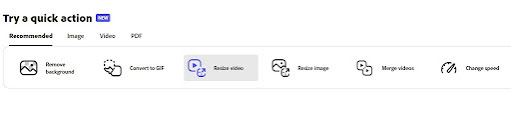
Convert to Another Format

Well... I don't have every file format but let's work with what I've got

  • AVI - Nope. There were dozens of variations of AVI so not too bummed about this.
  • MOD - Nope. Couldn't even get it to show up as a file format.
  • MOV the old school kind created for Windows - Yes but it might take a while, depending on the size of your video. Maximum file size is 1GB. 
  • MPG - Yes, shockingly it did it. It is a one minute video and it took about 4 minutes or so.
  • WMV - Nope

They have a bunch of doo-dad that if you have a use for them like converting an image or two into a .gif then go for it.

Not going into the A.I. features because I am still learning how to write an effective prompt. A necessary skill. 

So, What is the Catch?

Now as I am found of saying, free is not free. Adobe would very much like you to buy the premium subscription plan. You would have access to all templates, assets and storage for your projects.

If you like the interface and the access to Adobe Stock then the monthly subscription is $9.99 a month. You probably should do the free trial first to really confirm that this is the bees knees for you and your needs.


Monday, December 13, 2021

Transition Time - From Adobe Spark to Adobe Creative Cloud Express

February 02, 2022 Update:

I do have a correction; Adobe Spark is gone. History. As in it has gone to the vapor land of software. 

Things are a little goofy at the moment. What was publicly visible for a person to test out is now in the menu. You might have to click more to get to the tools. 

Adobe Creative Cloud Express

The product formerly known as Adobe Spark has a new name and some new features.  I found out about it via Twitter. Not from a corporate account, but via a friend's post. Been a long while since I was on the site.

I've messed around with Adobe Spark Video. I had to learn to work within the constrictions. And once you did it was...ok.

But then, as it happens the new stuff makes you forget about the old stuff. Because the new stuff is a whole lot easier to us.

And a serious reduction of constrictions. Even for free.

For the record, I don't have a problem paying for software. I do it. But I have to be able to get something out of it and not have to go to another program to finish it up. Like I did with Spark Video.

But this is a new day and a new user experience.

For your account and if you have an iPhone or Android device you now have access to:

  • Premier Rush
  • Photoshop Express

Those of us that are desktop users can have access to Premier Rush.


You will have access to some but not all of the features of these programs. If you want full access it will cost you $10 a month.  I tried Rush once but I don't remember it much. This might be a good opportunity to give it a second chance. 

This is just a head's up. 

Maybe during the holiday down time I can take a look at it and see if it is worth diving into. 


Sunday, July 18, 2021

Jumprope App - Creating How-To Guides

October 2021 Update: Toot the horn folks - Jumprope is no more. Kicked the bucket a few months ago. I really like the focus on making it super easy to create a tutorial. Ah well, they come and they go.

Historical Page of the Deceased App

There are some of us that honestly just like to share what we know. But there is a gowning media market regarding selling via education type products. Nothing wrong with that. People have been doing it for centuries.

The tech has changed but the desire to share what we know is in our blood. One of the companies that make it easy to create education products is called Jumprope. Users can create educational guides that can be shared on social media or on a blog or website. 

The How-To guides can be:

  • Photos with captions
  • Photos with audio
  • Photos and video
  • Video with captions

How it Works

This is an example video from the company explaining how to create a guide.


What You Will Need

For creating a Jumprope guide, mobile users will need to download the app via Apple App Store or Google Play.

Devices

Android phones and tablets running Android 6.0 or higher.

Apple phones and tablets running iOS 11.0 or higher.

Desktop Browsers: you can view Jumprope guides via any browser but you cannot create them.

What Can You Do With a Jumprope Guide:

  • Quickly create how guides and videos.
  • Use it to demonstrate skills and expertise.
  • Use it as a means to generate income with affiliate links to the products used in the guide.
  • Repurpose prior content.
It is one of the quickest ways to create educational type content. 

It is bone easy to do and it cost you nothing to check it out.


Friday, June 4, 2021

A Look at Pablo by Buffer

There are new apps on the block. And then there are the old reliable bit of kit. Sometimes remembered. Other times, an old favorite is shoved up in the corner. 

Just waiting for the right person to accept him/her/they and enjoy simplicity.

Pablo by Buffer has been around the bend. Probably was created when the bend was being formed. I don't know. I do know it is a simple, quick way to create social media graphics with text. 

And that it is a free web app.

Getting Started

When you first land on the page an ad for another Buffer app called Buffer Remix will appear. Has a lot of nifty features for Android and Apple devices.


If you are not interested checking out the app, click the Dismiss link (down at the bottom in white text) or click any place away from the image and on the screen. 


You can format images for:

  • Pinterest
  • Square format, good for audiogram covers, Facebook ads or other sites that prefer the square format
  • Twitter or YouTube

Side menu for aspect ratio, text and adding logo

But wait, there is more.

If you want to add a logo image inside of the photo you can do that too. Can add text, change the font and move it where you want. 

Template Menu from Pablo

There are templates and 600k of free images to help you get a jump on your message or social media comment. 

And that is about it. No importing audio or video. No whiteboard animation. Just a simple graphics editor to help you create text and photo social media content.  

Or you could use your imagination and come up with new ways to use the images.

That is up to you. 

Tuesday, May 25, 2021

Unsplash Sold to Getty Images

Lot of things going on in the social media space. In March 2021, Unsplash was acquired by Getty Images. Big whoop you might say.

Well, it kinda is. 

If you use Unsplash for making audiograms, IG stories or any kind of social media content. Can't begin to count the number of YouTubers using Unsplash photos inside of their videos. 

Home Page of Unsplash

Millions of people around the world contribute photos to Unsplash. Those photos have been used by social media services such as Canva, Relay That and dozen more. 

Getty Images is a huge stock imaging company. Their holdings include historical photos, video and so much other content. It primarily deals with corporate and professional customers. 

The current word is that Unsplash will remain a separate company. But I would expect that at some point, a few Getty images would be mixed in for purchase. Or there could be an opportunity for Unsplash contributors to access some income opportunities.

For those of us in the social media space it could have an effect on how long social media providers will continue to offer Unsplash images. 

Or will the also be required to include items from Getty Images?

I don't know.

But if you have a project you kinda, sorta want to do - you might want to get a move on it.

While you can.

Sunday, May 16, 2021

Four Random Items for the Creative Tool Kit

There are so many software as services regarding creating audio and video content. This is just a brief look at some of the tools I've found along the way. 

Some will be helpful to a variety of creators or one of the tools might scratch a specific itch. But you know it is good if it hits that exact spot. I know if I don't write them down I'm going to loose or forget them.

Analytics

Chartable helps you to understand your audience by finding out where you place on various podcasting portals, including Apple and Spotify. There is a free option with once a day stats.

Image Cropping

You have the perfect photo for your album cover but you need to get it into a specific aspect ratio. Croppola can help you to crop to the square 1:1 format or a few of the others needed for social media. You can use the Auto function or figure it out for yourself. 

It is free at the moment, but understand that images are only stored for about an hour or so. If you like what you have, download it immediately. 


Recording via Browser

There are times when you find yourself needing to make a recording. I think I was at a conference and forgot that I left a recording on my desktop computer. 

All I had was my Chromebook, a portable microphone and no editing gear. 

I could have used something like Resonate Recorder. You record using the Chrome browser and can download audio in the .wav format. 

There is a free version that allows for solo recording. The paid plan has feature like automatic backup, more folks to record and other features.

Transcription

Podseo.io is an transcription service for podcasts and for those folks that have to provide alternative text content. 

You can upload your audio or video to the service and it will provide a transcription of your content.


Sunday, March 28, 2021

Biteable - Creating Podcast Audiograms

Update 2022 - Bitable is ending their free version of their service.

In May of 2022 they retired Bitable Lite. 

Now they are ending the free version of their service. If you have any video on the site that you haven't downloaded you have until August 30, 2022. After that date you cannot download your content. 

This service is constantly evolving and trying new directions. This time it is more business related social media generated content. 

The text below is now historical and you might just go on over to the main site to check out what is going on with the current version. I have other services that I use and probably will not be a customer.

This is a look at the 2021 version of Biteable. It is an online video editor/presentation service with a number of templates that can be used for social media creation and can help you create podcast audiograms. 

Way back in 2017, I had a subscription to the service. I wanted to make explainer videos. It wasn't as easy as I hoped. 

I remember it was more finicky that I wanted to deal with at that time. I bailed out of renewing my subscription. 

Honestly, I forgot about it.

Time marched on. I was looking at another audiogram service and the name popped up. So I come with a raised eyebrow but willing to give it a second chance.

Just a head's up...

Biteable free version can be used for non-commercial use. You may be restricted from using some of the assets available to you. You can download to 720p with two Bitable watermarks on the video.

Biteable Premium and above allows for full access to assets, no Bitable watermarks and export at 1080p video.

What You Will Need


Familiar with navigating to folders on your computer. Drag and Drop or knowing how to find a file or folder will help.

Being patient as you learn how to use the interface, especially on the pre-created templates. 

Devices

Chromebook/Mac/Linux/Windows via a browser.

Assets

Podcast album art

Audio recording - mp3 or wav format

Getting Started

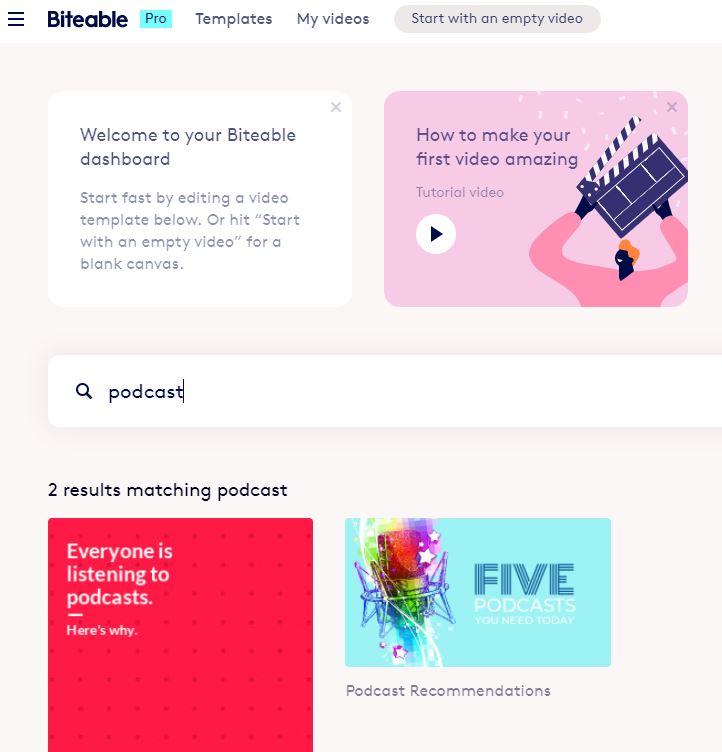
You can start with a blank template or use a template with a pre-designed format.

This is one of the rare occasions where I would suggest starting with a the video tutorial on the site. Then use the blank template to get a feel for the work area.


Dashboard of Biteable Screen


This is an introduction video from the company on how it works.


Advantages

Once you get the hang of it you can quickly create a podcast audiogram. You can create audiogram videos for the various Instagram, Facebook and YouTube formats

You also have access to animations, audio, and video assets.

You can upload your audio narration.

My 30-second test video mp4 video download was quick. Your experience could be different.

The free version contains two watermarks on the video and downloads as a 720p video. For a podcast audiogram, that should be enough. If you have video, it may or may not be an issue.

Disadvantages

No Captions/Subtitles

There is no native captioning/subtitles. For education creators that could be a concern. 

You could manually add text on an image. Some of the image or video layouts may not be accommodating to displaying text on the screen.

Audio Narration Fade Out

You can select music to go with your podcast audiogram. You can also uploading your narration.

Which I did; had my album cover and my audio.

I discovered that the audio faded out before the narration was completed. 

It took a bit to figure out that you can add a duplicate screen of the album cover. 

This will allow more time. I added two additional duplicates. That solved one problem. But that created another problem.

Accessing Support

I needed to trim the silent time from the end of the video. When I went to look for the help pages or FAQ, I couldn't find it. There is a menu option for support. 

I typed in the word "trim" because now I had too much image and not enough audio. 

I was given suggestions on an un-related topic. I could have done a chat session. I chose not to do that. 

I went back to their YouTube page and watched another demo video. I eventually got an answer.

Editing and Deleting Assets

If you work with a template you might find that you need to remove certain assets. 

Removing the text blocks is very easy. But if you wanted to change a video or remove a scene you have to find three dots on the audio or video track. Left click on the track and they will appear. Click the dots and select delete scene.

To a new user who hasn't seen the training video, it isn't obvious.  I think the idea is to for users to make a few text or image changes to the template and let it rip. 

Summary

Bitable has a lot of pre-made templates to help creators get started. If you want to get a look at the templates, you can check out their YouTube channel. 

Has it improved? Yes, absolutely. 

For novice video creators, this could work as a simple podcast audiogram generator.

If you are a creator that has to churn out social media ads, podcast audiograms or other content this might work for you. 

If you need power and control over every element then go hug on Adobe Premier or Vegas Pro.


Sunday, March 7, 2021

Adobe Spark Video for Podcast Audiograms

June 2022 Update:

Adobe Spark is gone. History. It has been replaced with Adobe Creative Cloud Express. 

The post below is for historical reference. 

The software/app provides an interesting way to create a simple podcast audiogram. It is a wee bit quirky but it does work. If you respect the limitations.  

Adobe Spark Video is a grand lesson in managing expectations. This isn't Adobe Rush. It dang sure isn't Premier Elements or Premier Pro. It is a niche product that can do limited things very well. 

What You Will Need:

An Adobe Account via:

  • an email log-in
  • an existing subscription to Adobe Creative Cloud
  • a social media account from either Google or Facebook
Devices:

  • Chrome via browser
  • Mac or Windows on-line via browser or desktop application
  • iPhone or iPad

There is no Spark Video Android app at this time, but you might be able to use the browser version. There is Spark Post for Android that can design and animate graphics.

Assets:

  • Podcast album art
  • Microphone (Optional)
  • Audio recording - mp3 format

Test of Voice Only Video


Test of Music Version


Advantages:

You can record directly into the app. You can also upload your own music or a mp3 voice audio clip.

Let's talk about that. You can do that and attach it to your slide. It needs to be short, like under 30 seconds. 

The software thinks that you are uploading "music." You might find that the audio clip might repeat again at the end of the recording.

You can do customizations, add stock music, access some free stock photos and image icons.

The free version does almost everything you need to produce a simple podcast audiogram. You will have an Adobe Spark watermark on the video.  To remove the watermark you can purchase a monthly or yearly subscription to have it removed.

Disadvantages:

Based on my prior experience with the software, I would say that there is a safety limit of about ten seconds of recording per slide. Yes, it does indicate that it can go to 30 seconds. 

I would not trust it. I have had crash and burns when I tried to overload what it could handle.

You could duplicate the slide to gain more talking time. That would work. 

You can upload video. If it is 30 seconds or shorter. Load fifteen minutes if you want to. You will only see or select about 30 seconds of the video. 

Free version contains watermarks on image, a credits page and a non-removal page banner from Adobe. Ethically speaking, these items should remain on the video. For the non-ethically impaired, pay for the App or don't grip about it.

You really should read or be aware of the Community Guidelines and the Adobe Terms of Service. 

The short version is they own their stuff.  You own your stuff. Don't steal other peoples stuff . If you do stuff that is illegal, hateful or violates the terms of service you are gonna get bounced. Know that your podcast audiogram might not be the kind of content that Adobe would want to associate with their brand or community. 

Summary

With a bit of tweaking and elbow grease you could make something interesting. There are easier and slicker apps that can make an audiogram for you. If you can work around the limitation, there is gold in them there hills.

Sunday, October 15, 2017

Test of Biteable Video Making Service

Update 2021 - This company has totally revised their product - much easier to use now. I have an updated review of the current version of Bitetable.  The text below remains for historical purposes.

Not really back in the game but I am testing out animation services for Explainer videos. This is a service called Bitable.com; there are free and paid options for easy animation style videos.


The Difference Between Zoom vs. Zoom.us Recorder on Biteable.

The free version will allow you limited access to templates and audio. You can embed video and share via the website. 

You can share via Facebook, Twitter and YouTube but I think you have to give the service permission to post to your account.


Wednesday, October 1, 2014

Brief Clip by Kevin Spacey on Storytelling

The universe will support you when you state and act on your intentions. Actor/Producer Kevin Spacey gave a keynote speech at the Content Marketing World 2014. Yep, he is talking about storytelling and trying to convince the crowd it is first about the story.


KPT Marketing has 27 minutes of the keynote, there are jokes, impressions and truths about storytelling. There are some gems to be gathered.

Other Posts of Interest


Monday, September 8, 2014

Head Up on Kickstarter Film Festival 2014

If you happen to be in the Los Angeles area on Saturday September 12, 2014 and can't find stuff to do (which is dang near impossible, by the way) you might want to shimmy over to the Kickstarter Film Festival. Yes, those dollars do add up to actual goods, services and completed videos and motion pictures.


Not just about the films, there will be some crafting items, food trucks and the opportunity to meet others not digitally replicated by an avatar. But mainly about the community of supporters watching what creators promised to do and did it.

Not much more to say about that so if you can find the L.A. Zoo you can find the film fest.

Oh, one more thing. My use of the term social media is very broad. Bound to disappoint the purists.

Other Posts of Interest

Sunday, August 3, 2014

Heads Up for Seattle VloggerFair 2014

If you are going to be near the Seattle, Washington area on August 16, 2014 you might want to try to snag a ticket to VloggerFair 2014.


Grove on the above video for a sense of the event; sounds like it is a mash-up of a barcamp meets Vloggers of note. It is very affordable at $49 and who doesn't like to mingle with vloggers?

It is a bit of a late notice because I just found out about it via Twitter. Which is why I think those who want to go that live near the northern California, Oregon and Seattle areas have the best shot of attending at this late date.

Other Posts of Interests


Tuesday, July 22, 2014

Videobbloging 10 Years Later 5by5 Interview

It is the 10th anniversary of video on the Internet and the videoblogging group. The Yahoo Groups interface was clunky but a group of people from all over the world got together and figured out how to place video on the Internet.

And unlike what passes for social interactions these days we actually listened to each other, supported, disagreed with facts and met up at various functions. Not saying we were angels I felt it was a safe place. Many people did.

So no, you don't have to damn and cuss someone back to the 9 generation because you disagree with a statement. I digress. It is a peeve.

This is an interview by Jen Simmons with Jay Dedmon, Ryan Hodson and Micheal Verdi. If you are having trouble playing the audio or would like to read the transcript you can visit Jen's The Web Ahead page.


Now I don't want to be misunderstood. There was video on the Internet before the videoblogging group. But it wasn't remotely easy to do. We are talking postage stamp sized videos. I remember video from the hoochi-coochie sites and from tech sites like the original Code Monkey and Help.com

Back in the day, people were trying to transfer analog content from VHS and Hi-8 to the web. You needed a converter. Which there wasn't one on the consumer level until the 2000s. Sometimes that was done using software but it was still tricky.

A lot of things had to be figured out.

And just when that had been figured out came the digital camcorders and memory card storage appeared on the scene. Boom, change again. Then Smartphones recording video. Kaboom, disruptions again.

Now Google glass and the knockoffs.

Other Posts of Interest

Thursday, May 29, 2014

In The News...Yahoo Video Take Two

It has been reported by Ad Age but not official announced that Yahoo! is going to start a YouTube like service. And by YouTube like service it seems to be "popular" YouTube performers migrating over to the channel

It is not clear that it will be open to all user generated content. It seems to be an advertising supported with content as the wrapper.

I remember back in the 2004 when Yahoo! tried to have a video web hosting service. It became a dumping ground for copyrighted content, user content and those folks that had deep needs to see naked bodies in motion.

It was a PITA to find anything and uploading was dicey at best. This is going to be very different. For one thing, they already have a curated video service at Yahoo Screen.


Have you been to it lately? That is my point. When people think about checking out a video they go to YouTube first and maybe Vimeo second. They have a lot of work to do to make this happen.

If they are using it as a money generation service (and there is nothing wrong with that) then they are going to have to get creators and viewers attention.

Gonna be a challenge.

Stay tuned.


Thursday, May 8, 2014

My Thoughts About Net Neutrality and User Generated Video

Whew! It has been hectic. I had a final project that scraped every brain cell on read alert. It is done. I get a breather for a bit.

A lot of things are going on that will affect user generated content. It is hard to keep up but there are a number of forces that are going to do their best to return things to the prior century mode of communication. Top down. Limited access.

The biggest news is the current handing of Net Neutrality. This the principle that Internet service providers and governments should all data on the Internet should be processed and treated the same.
There should not be companies and businesses that set tolls, extra fees and (it will come) ideological road block to access to content.


This is a video by Vi Hart that will visually explain what the deal is and how we are gonna get screwed. The phone and cable companies are gunning hard to make this happen.

Places like Netflix have already capitulated and paid access improved access fees to Comcast and Verizon. Comcast deliberately slowed down the speeds of Netflix videos to make their point about throttling access.

The hope is that the FCC has a come to Jeebus moment and regulates the Internet as a necessary public utility.

It ain't looking good.

So, what has this got to do with user generated video? Well... the phone and cable based Internet providers are busy capping how much Internet a user can access via their mobile devices and their desktop access.

For example, on my mobile Wi-Fi I pay $35 for unlimited access. If my if my service switches to 4G LTE then I will be required to pay $55 with a cap of 6GB. If I exceed the 6GBs then I have to pay extra.

For the record, I churn about 12-15GB easy. And no, I am not a gamer.

So, some of you say, get cable internet. Right, where I'll pay $60 to start with a 10GB cap.

So if you create web videos and up load them to Vimeo and YouTube that will count against your allotted usage. That is just at the consumer ISP level. What if the phone and cable companies start smiling at Vimeo and YouTube?

If you watched Vi's video you know that they will put the touch on both of those two companies and charge them fees for "taking up too much pipe."

The word I'm looking for is, um ....extortion.

YouTube might decide that it no longer wants to host cat videos or other types of non-income generating content.

Vimeo, who do not have as deep pockets like YouTube might decide to snuggle up to independent commercial content creators who put out a consistent product and churn cash.

So what to do?

You can read the official FCC Open Internet page to get their understanding on the issue. I have to say what is on that page and what was proposed by the FCC in early April 2014 seems a world apart.

You can check out Save the Internet to learn more about it or see if they have some ideas to fight it.

Common Cause has more information and a link to a form letter that can be sent to your federal representatives. 

Whoa. I actually fighting for the right to access cat videos. Strange days indeed.

P.S. Nothing against cat and/or dog videos.

Wednesday, April 9, 2014

A Peep Look at The Shorty Awards

The Shorty Awards have come and gone. I meant to watch the live streaming but got caught up in a narrative spoken word piece by Charles Bukowski and became discombobulated.


No, it is not the Vloggies or the Winnies. There was a party, so there is something about tradition.

The Short Awards focus on the best use of social media which includes the use of Vine, Instagram and yes, Gif files to communicate a message. There are some representation of videobloggers and people that use web video.
 

Special shout out to the Grand Master of the Use of Social Media; Mr. George Takei who has dominion on Twitter, Tumblr and whatever the heck he wants to communicate with humor, grace or slashing focus on the truth.


Too hip, gotta go.


Sunday, April 6, 2014

SciFi London 48HR YouTube Storytelling Challenge

Stuff is happening all over the joint. This time it is in the UK but all sentient beings are invited to participate. The SciFi London 48 Hour YouTube Storytelling Challenge is you, your gear, imagination and talent making a story video of a Sci-Fi fictional nature.

Here is the lovely and charming Mr. Stuart Ashen to give you the details and an example of what you can do:


If you can't see the video you can get the essential information from the Challenge information page. Now, this is a London contest running on United Kingdom time. They gronk UTC and BST so if you don't want to be left out then you'll want to confirm entry time with a site like TimeAndDate.com.

1:00 p.m. London BST is 8:00 a.m. in Grist Fiord, Canada and 5:00 a.m. in San Diego, USA.

My understanding from the video is that it doesn't necessarily have to be a talking head video but since you only have 48 hours you aren't going to recreate Forbidden Planet either.

There are prizes but the really the good stuff is going to come from the videos and the creativity behind them.


Other Posts of Interest

Monday, March 31, 2014

UNEP World Environmental Day Videoblogging Contest

UNEP World Environment Day 2014 is June 5, 2014. They are looking for videobloggers to submit videos regarding small islands and global warming/changes.

I just found out about this. For many of us it is too late to enter. However, if you have a video ready to go and you can upload it by April 4, 2014 you might do yourself some good and help the world out as well.


http://www.unep.org/wed/blog-competition/how-to-enter.asp

Here are details as I know them.

  • You need to make a video about the problems and or possible solutions about global warming as it pertains to small islands.
  • You can use your phone, tablet or whatever you got to get the message across.
  • The video needs to be less than 2 minutes in length. Any more and it will be disqualified.
  • Post to YouKu for folks in China and YouTube for everybody eles.
  • Plunk a message on the UNEP Facebook page
You don't have much time, Contest entries must be submitted by April 4, 2014. Check the FAQ for exact details.


And now to truly show my age I do not know who this person is but young women folks are drooling over him. Give Mr. Somerhalder a listen to help spark you up about the contest.

Like I said, I had no idea about the contest until a few moments ago. Would have love to put the word out about it. Oh well, do what we can when we can.

Other Posts of Interest

Friday, March 21, 2014

Got Video on Qik? Move It Or Lose It

With every innovation comes a shutting of the door. Qik is (was) a mobile video recording and sharing app for Android and iOS mobile devices. Qik is owned by Microsoft which owns Skype. Many of the features of Qik have been incorporated into Skype so that leaves little reason to continue supporting Qik.


Link to Qik Support Page

The short version is that if you have videos on the Qik site you need to download them before April 30, 2014. If you don't your content is history. The app will not function and life will go on without Qik.

My philosophy is to have a backup copy and then create an offline backup copy.

Your alternatives are Instagram, Vine and whomever is left standing in the dust.


Other Posts of Interest


Wednesday, March 19, 2014

A Place for Daily Vloggers

Ah, here we go, a bit of home spun old timey vlogging. Was it really so long ago that people and their web cams talked and shared about their lives, ambitions and feelings? In this age of money making syndicated content it is easy to forget the humble beginnings of web video.

In 2004 it was about people.


http://dailyvloggers.com


The original meaning of vlogger (in my humble opinion) was a person that did person narrative on a daily or weekly basis. That was expanded on by other folks that wanted to create videos that wasn't a talking head personal narrative but was indeed personal. Or funny. Or educational. It is what you want it to be.

You don't necessarily have to go to YouTube to find daily vloggers. There is a site called DailyVloggers that is a repository of those people who are doing daily or serial vlogging. At the desks. In the car (oh please let it be a parked car) or on foot with with video sunglasses.

You can sample some of the vlogger content on the desktop or through the Android mobile app.

It seems that many folks use YouTube to host and then have content posted on this site as well. It seems to be time slices of a persons life, talking about what is going on or whatever comes to the surface.

This is a good way to sample personal narrative content without having to fish it out of the walled YouTube garden.

Other Posts of Interest