Showing posts with label Buying Camcorders. Show all posts

Wednesday, December 10, 2014

Pivothead Kudu Initial Impressions

Howdy. Having some technical difficulties as well as bandwidth issues. Not resolved but making progress. Anytime it takes 222 minutes to upload a 87MB file there is a problem. For the record; the video crashed just before final acceptance. So no video.
On to more important matters. I was tempted by an ad for a pair of Pivothead Kudu video glasses, eyeware what ever you want to call them. The $199.99 price was right and I went for it.


Quick Specs

  • 1080p video with options to downshift to 720p at 60fps or 720p at 30fps
  • 8GB internal storage for about an hour of video
  • Field of view is 75 degrees so no fisheye effect; to some that is a deal breaker but not for me.
  • Can take stills at 8MB, 5MB and 3MB
The photo shows light lens but mine are dark and that can be an issue if you want to record inside. Questions will be asked like "do you have an eye problem?" I believe I can swap out the lens for clear glass but I'll need to hip hop back to the website to make sure my model can do that.

Recording is easy. Very simple to operate. Walking while recording is challenging. In my first attempts I learned that I move my head a lot. I finally got some decent video to show and then crash, boom, no ability to upload.

Oops, gotta go.

Tuesday, August 26, 2014

Recording With ATC Chameleon Action Dual Lens Camera

Well, it has been a dry spell in the western portion of the United States. No water rafting around here. We have earthquakes but I'd rather not invoke an invitation to an earth thumping event. Don't have a bike or skateboard so that is out.

So I use what I have available. This is a test of the color quality from the ATC Chameleon Action Dual Lens Camera.


Recording Video

This experience is much like how people recorded photos and Super8 moves from years gone by; your capture a recording but you don't know what you have until you get home and process it. What I saw with my naked eyes versus the camera are two different experiences.

The camera has fish-eye lenses. I do not.

In the supermarket there is a mixture of daylight and florescent lighting. Product labels were really saturated with excess color. This was really noticeable with a bag of onions.  White label products were over saturated to the point of blowing out.

The video recorded outside in late afternoon; the colors were a bit more normal but still cranked up.

Editing the Video

The ATC Chameleon records in .mp4 so you'd think there would not be a problem editing the video. Depending on what you have it might be a challenged.

  • QuickTime Pro - no problem reading the file but I can only make straight cuts or join video. 
  • Sony Vegas Studio 11 - could not open the video. There was no designation for 1980x1280p at 30 fps. There is one for 60i but that isn't what I have. Didn't matter - refused or open the file.
  • GoPro Studio had no problem opening the video but in order to work with it the software converted it into an avi video. An 8GB video. The original file was only 78MB.
  • Serif Movie Plus X6 could read and edit the video but I again ran in to the problem of no designation for 1980x1280p at 30fps.  I could go high but not lower. I manage to get the above video but the black bars arrived for added decoration.
I'm looking for a workable solution.

Still in testing mode...

Other Posts of Interest

Sunday, August 24, 2014

Quick Look at ATC Chameleon Dual Lens Video Camera

I just got this camera yesterday and I am recording video that I'll have up in another post. The Oregon Scientific ATC Action Video Camera (and yes, that is a mouthful) has the distinction of being a dual lens camera/camcorder. The camera record 1080p video at 30 frame per second. Split that two ways and you get 720p video from the front and back lens. That can lead to some really trippy videos.

This is not a new camera; it has been available since 2012.


Let me say up front that I got this on sale on Woot.com for about $40. It retails for $149 and I have seen ads for it around the $80-$90 range. I think under $60 is about right for this camera if you understand and can live with the limitations.

But first,

The Specs:

Video Resolution: Both lenses record separately 720p at 30fps On the camera you can select side by side or top to bottom recording. You would need to use software from the web site to do things like picture in picture or viewing video from a specific lens.

Audio: I checked the video properties using QuickTime Pro; seems to be Monaural AAC at 22,000 kHz per second. Remember, you aren't buying this for the audio quality. If you are near the camcorder it will pick up your narration but it will also pick up every gust of air or wind that the camera encounters. 

Focus and Field of View: This is a fixed focus camcorder. Keep in mind that it is also a fish-eye type lens. You manual adjust the lenses to record at the angle that you want up to 170 degrees. One lens records north/south and the other records left and right.

Storage: There is no internal storage. It can record on a micro SD card up to 32GB. The camera would prefer a class 10 card, I was able to record adequately on a class 4 memory card. 

Battery and Battery Life: Internal non-removable 1000mAh Lithium-Polymer Battery that should hold up for about two hours.

Body: Plastic all the way and that might not be a bad thing. While recording, I hadn't secured it firmly in the mount and it fell out. No harm done with no visible damage. The actual aperture is tiny, maybe F/16 or F/22. I can find no information about the size of the sensor.

It is also important to know what the camera doesn't have:

  • There is no LCD and no ability to attach one. 
  • There is no internal image stabilization. You find a way to hold it steady or you mount the camera on something.
  • There is no way to take a still photo; it is just video.

So, Why Would You Want This Camera?  

I can see a use for this as a supplemental camera for recording music events. It is a way to get the musician and audience in the same recording without swiveling from one to the other.

Perhaps as secondary camera for demonstration or training videos where you are trying to show someone how to do a task and you want an alternative view as you are doing it.

For the right price this could be your GoPro type camera for infrequent action type videos you might want to record.

And yeah, for citizen journalism purposes as well.

Other Posts of Interest

Sunday, August 17, 2014

Safely Recording the Police Using POV Glasses

There really might be a good reason to wear your sunglasses at night. For example, there are a number of police cars parked in front of your driveway. With a pair of recording Point of View (POV) glasses you could be assured that what is happening can be confirmed independent of a police report.

Keep your safety in mind at all times. We all can search for ways to safely record police officers but there is no way to stop a bad cop from trying to stop you.

They have guns. Guns kill people. You are people.


POV recording glasses is not a new idea; it has been around for a while but as with many things the technology has improved quite a bit.

The Pros of POV Glasses are:
  • What you see is what you record.
  • You can take still photos and videos with a touch of a button.
  • With minimum tech savvy you can transfer videos to your computer. This means you know how to attach USB cable to the glasses or you know how to remove the microSD card and place the memory card into the computer.
 The Cons of POV Glasses are:
  • We don't notice how much we move our heads. You will have to practice on using the glasses to keep a steady and stable recording.
  • From a distance recording glasses are not noticeable. Up close they announce their presence.You will need to decide just how close you want to record without potential interference.
  • There is a wide variety of video formats using in POV videos like .avi, motion jpg, .mov and mp4. If you use Windows Movie Maker to view and edit videos and your video format isn't compatible (.mov) then you have a minor problem. It can be solved but if you are not a techie you might not want to solve it. You want to get a POV glasses that are compatible with what you use. 
  • However if you only use YouTube and the YouTube Editor you are kinda safe from worry.

Like their action camcorder cousins, the Pivothead brand glasses are designed for hands free recording.

You can take still photos or record video with buttons on the right side of the glasses. There is a choice of recording modes from old school 320x240 to 1080p and a bunch recording modes in-between. The POV glasses have a built in microphone. You can swap out the sunglasses for prescription glasses if you really need to see where you are going.

This is a commercial for Pivothead:


At $199 the basic model is fine for most people. However if you have or want the ability to connect to a tablet, smartphone or other devices you will want to check out the available accessories or the new models that are juicy to contemplate.

At $139 is the iVue Classic 720p is kinda sweet, not as discreet as you would like but a good deal at this price. 720p, 8GB storage, 140 degree wide angle lens with a functional one button on/off switch.
Another bonus is that you can change lens. The Classic 720p records in the .avi video format which should be compatible with just about anything.

The main drawback is that there is no memory card, the videos are stored in internal memory. You will need to attached the glasses to the computer to transfer the videos. Of if you glasses get snatched you are S.O.L. (Stone out of Luck)

There is another option with Google Glass which at $1,500 is not affordable for real working people. You might want to keep an eye on the Brickhouse Security site but their stuff is kinda expensive.

I wish there was another affordable brand name competitor. There are a lot of cheap knockoff POV glasses. Most are crap.

The knockoff POV glasses can cost between $25 to $100 but this really is a buyer beware area. You can find a ton of them on eBay and Amazon.

I implore you to read the comments and do research before you buy POV glasses from any store or on-line vendor.

Other Posts of Interest

Safely Recording the Police Using Action Cams

Let's get this straight, you do have the ability and the legal right as U.S. citizens to record police officers. You have the right to record video from your property or on a public street. As we have learned, some police officers have not read the constitution or are inclined to prevent you from countering their mythical view of events.

We need to protect ourselves and our neighborhoods. These are ideas to consider.

There is only one thing I require you to keep in mind. Your personal safety. It it dangerous. It is hunting season and those with a license are taking aim.

Action Camcorders

Action Camcorder are generally used by people doing sporting adventures or events. The most famous of these are the GoPro line of action camcorders. One of the things that makes action camcorders attractive is that the have the ability to a record wide angle view of a mountain, river or police action.

Pro:
  • Small, light and can be hidden from view.
  • Generally have a wide recording angle so that you have a good expansive view of the area.
  • Some models are WiFi enabled; meaning if they are connected to a smarphone, tablet or computer you could potentially upload video quickly to a web hosting service like YouTube.
Cons:
  • Most action camcorders do not have a viewfinder or you would have to pay extra to obtain one. Not a deal breaker because of the wide angle recording but you won't know what you have until you look at it later.
  • Action camcorders do not like being handheld. They are usually mounted on helmets, braces or tripods. There is no image stabilization so hand held videos can be really shaky.
  • You need to be minimally computer savvy to either connect the computer  to the camcorder or remove the memory card and get it to the computer. How savvy? Connect the USB cable to the camcorder to the computer and then transfer the video files.
  • Cost; decent action camcorders start about $180 to the $400 range. Knock offs can be found for about $100 on up but quality can be dicey.

So here are some options:


For affordability the basic $199 GoPro Hero3 would be a good choice, good audio, wide angle view and excellent video quality. This is the standard that the others try to meet. I'm thinking this would be good as a porch cam or resting on a window ledge. Again, Hero3 doesn't like to be held by hand, but if you have no choice this can capture a wide view of the situation.


Another contender is the Sony HD Flash Memory Action Camcorder. A bit more pricy than the Hero3 at $250 but it can record up to 4 hours before a charge and can record on Sony Memory Stick Micro or microSD cards to extend your recording time.

Need to be a bit more mobile? I think the Panasonic HX-A100 might be of interest. This is a wearable action camcorder that you could use like a Bluetooth headset. You'd have to purchase the Ear Hook and other accessories. Again, good video quality, fair audio quality and can be secured for on the street recording.


I know these are expensive options. These devices were built to be seen, be mounted in motion for more pleasant purposes. The way I am envisioning there use is that a home owner or renter sees an event from their property. They could use this type of camcorder mounted away from their body to record without notice of law enforcement.

Other Posts of Interest


Saturday, April 12, 2014

Quick Look at Q4 Handy Video Recorder

I have got to learn not to look at Samy's Camera ads during tax time. There I was, trying hard not to look at the Canon T3i when I saw it; the Zoom Q4 Handy Video Recorder. I thought most vendors had given up marketing the smaller Point and Share Camcorders.

What has happened is that Canon, Sony and Zoom are making small camcorders for musicians. The are concentrating on quality audio recording with an video component. What is good for musicians is also good for storytellers, journalists and archivists.

This is a video from a vendor; Guitar Center, doing an advertorial about the device.


Looks kinda tasty to me. After getting seriously burned in my workshop project by sketchy audio, I am more than willing to trust Zoom to handle the audio for me.

I like what I see, good microphones, able to monitor the audio and a detachable LCD panel. There is another video from Sound and Gear that does test the features of the camera so you should check that out as well.

Quick Look at the Specs

  • MPEG4-AVC/H.264 recording HD up to 1920 x 1080p at 30 fps. Also record 1280 x 720p at 60 fps.
  •  Line-In/Stereo Mic Input Jack, Headphones/Line Output Jack
  • USB Port for Using Camcorder as a Webcam
  • SDHC/SDXC Memory Cards 128GB You are probably gonna want Class 10 cards with this device.
$300 plus tax? If you are a podcaster that needs occasional video, reporter or a serious videoblogger this could be a good investment. I'd need to see the video before plunking down cash money but it is attractive.

And small. This bad boy on weighs 1.8 ounces or 51.0291grams for folks on the other side of the pond.

I think I need to start a new penny jar campaign just to be on the safe side should I still want to check it out six months from now.

Other Posts of Interest:

Sunday, December 15, 2013

Long Time Coming - Digital Bolex 16

Like many people, I thought this was a pipe dream. Like take the money and run into a brick wall. It is part of the reason I try to stay away from Kickstarter campaigns. There are some that I've supported that have never hit the mark. Others took a long time; I received the product but the logistics of creating a brand new thing is and has always been a crap shoot.

Sometime you get lucky. Most of the time it is hard, nail dirty work. In 2012 there was a Kickstarter campaign that promised backers that the Digital Bolex D16, a RAW 2k camera, can be created that would look like the filmed images from the original Bolex 16mm film camera.

The project was funded in days. The actual delivery took a bit longer. People made fun of it, looked to other new products like the Black Magic Pocket Camera or just let it drift out of their minds.


This is a demonstration video recorded on the Red Line in Hollywood and then coming up for air at what looks like Hollywood and Vine. At night where the tourists and street people try not to collide with each other.

The Specs

1" CCD and records in Adobe CinemaDNG talking RAW uncompressed video.
32fps at 1080p and 60fps at 720p
Dual Compact Flash Card slots and a 400GH SSD hard drive.
Can attached an XLR microphone for professional mics and audio
This baby records anything from 480p to 1080p to 1152p or what they are calling Super 16mm mode.

It isn't the camera for me, not yet. I know that. But someday there will be a magical movie made with this camera that will go into places a full size movie camera cannot. It is an accessible bit of kit to those that know they can make a movie and they don't need the studio system to do it.

Not knocking the studio system. Just saying there is now the opportunity for expand options. The stories not yet told. Points of view not obstructed by a freaking bean counter.

I smell those bacon hot dogs, it is the future calling.

Other Posts of Interest

Wednesday, September 25, 2013

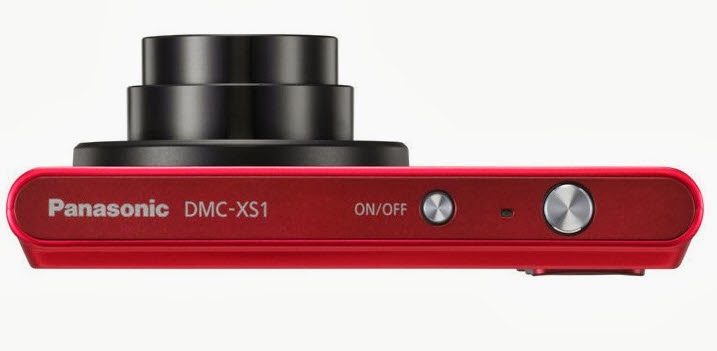
My Test Video of Panasonic DMC-XS1

I confess, I was in a vulnerable state. I didn't intend to buy the Panasonic DMC-XS1. But it was a long day. I felt a longing. Somehow I found myself in the camera store; reminiscing about D-76. Peeping at the DSLRs that I will never own. Sigh.

The store clerk asked "May I help you?"

Next thing I knew I was walking out the door with that new camera in the hand feeling.  When I got home and opened the box I was really surprised how small the camera was in my hand.


This is a test video from the camera. No filters were used. No macro mode to speak of. I have to say my expectations were guarded. Still have painful memories of that Fuji camera from long ago.


I read some of the reviews of other users. Some folks were not happy with the performance.

That might have been due to the type of memory card used;  a Class 2 card ain't gonna cut it. It should be functional at Class 4 but I would expect recording delays. I had no problems starting and stopping with the Class 10 card.

It isn't perfect. I haven't found a comfortable way to securely hold on to the camera. You want to put that strap on it. It won't take much effort for the camera to slip out of your hands.

Even with the limited time that I had to squeezed out of the day, I'm pleased that my effort to record moving people and objects was a good investment.


Other Posts of Interest

Monday, September 23, 2013

Quick Look at Panasonic DMC-XS1 for Video

The Panasonic DMC-XS1 is a point and shoot camera that records in 720p, is about as thin as a phone and the price point is very affordable to Frugalistas. 


I'm not in lust with it but I do like it. First, let's look at some of the video relevant specs:

Aperture is f/2.8 to f/6.9 This camera will do well in most daylight recording situations and okay indoors if there is enough light.

If you engage the telephoto lens the aperture/iris closes down to about f/6.9. If you are outside in bright sunlight not a real problem but indoors it could be an issue.

5x Optical Zoom, very acceptable for a camera this size and this thin. How thin?


Yes, that thin. This camera does have optical image stabilization for minor hand tremors but for long term recording you'll need a tripod or other type of support.

Focal Length - I normally don't mention focal length but this camera lens has the ability to record wide angle videos. The wide angle for video is 26mm to 130mm for telephoto. If you are into real estate photography, nature, architectural videos or you are taking video of the team this rascal can do it.

Recording Media is a Micro SDHC card. I have a box full of standard SDHC cards. I get grippy when I have to buy MicroSDHC cards.

Video Recording Format Motion JPEG in the QuickTime MOV format. Almost every video editor can accept the MOV format.

I did say almost.

Those of you using Windows Live Movie Maker and earlier versions of the videos editing software are going to have issues. Issues as in problems importing video. Windows Movie Maker cannot import MOV files. Windows Live Movie Maker can import .MP4 video but I have my doubts about MOVs.

You can record in 720p high definition or 480p standard definition down to old school 320 x 240. Please don't record in 320x240.

Audio records in Mono and if you use that zoom lens during recording it will pick up the sound of motion of the zoom. Which is why you don't want to zoom during a live recording.

Camera body comes in silver, black or red. The price points I have seen in local ads and the Internet is between $79 to $99 before tax.

So Who Is This Camera For?

To be honest, the specs read like 2011. Still, I think this could be attractive to folks that have a legitimate need for wide angle lens video recording.

I also think it is a functional day to day camera/camcorder without the bulk. If you don't want your phone to be your camera this is a good option.

If you are doing only web based video, can live with it recording in Motion JPEG/MOV then this is a good affordable camera.

Small size, 5x optical zoom and under $100.

I can't kick about it.

Other Posts of Interest

Tuesday, September 17, 2013

Quick Look at Sony HDR-MV1

This could be an interesting bit of kit. The Sony HDR-MV1 is the love child of the the action Go-Pro and the Zoom microphone line. It has possibilities if the right users could find their way to it. Per the Sony web site, they are thinking that musicians will gravitate to the device but I can see reporters and journalists giving this some serious thought as well.

For those that do interviews, conference interviews or hit it and quit journalism this could be a viable alternative to the Zoom Q-HD3.


The HDR-MV1 will not be officially released until December but this is what is known about the camcorder:

  • Aperture f/2.8 good for recording in dim places (but not great)
  • Image sensor 1/2.3 or 7.77mm
  • 20x Optical Zoom with a wide angle 120 degree lens
  • Records 1080p/30 frames per second
  • Dual microphones and the ability to hook up external microphones as well
  • Audio uncompressed at 48Hz 16bit
  • Video File Form AVC H.264 MP4
  • Records on Sony Memory Stick Mini or SD/SDHC/SDXC cards
Toss in some video filters, metering modes and shutter speeds from 1/30 to 1/10000 of a second and I think you got something here.

Tasty, very tasty. And it is small, palm small.

So if you are a musician, teacher, journalist or other folks that want quality video and audio and don't want to use your mobile device I think this might be worth keeping and eye out for. I'd want to see some test of the video before forking up cash money but it does seem to have possiblities.

Other Posts of Interest

Wednesday, July 31, 2013

Quick Look at Nokia 1020 Camera Phone for Video

It has been awhile since I have written about a recording device. When the point and share camcorder line was kicked to the curb by smartphone technology that forced me to make adjustments.

I can't freely use the word camcorder unless I'm talking about a dedicated device. I've been using the term recording device to cover smartphones and tablets, applications, still digital cameras and camcorders.


With the Windows Phone 8 Nokia 1020 camera with smartphone capabilities I'm pushed further across the line only I don't know where the line is anymore.

I feel the longing building up in me. I don't want to want it. But I do. I just do.

Before I go on a drool fest, here are the relevant specs:

Video Primary Camera: f/2.2 aperture (maximum lens opening) 1080p recording 30 frame per second recording .mp4 H.264 There is a 6x zoom but it is unclear if it is optical or digital. Optical image stabilization and auto focus.

Secondary Camera: 720p at .mp4 H.264 with an f/2.4 aperture.

Sensor: 1/1.5 inches with 41 megapixels saving in jpeg format.

Processor: Qualcomm Snapdragon™ S4 Dual-core 1.5 GHz Not going to be sluggish but Quad-core would be better.

Memory: Internal 2 GB, SD Card 32 GB and 7 GB Microsoft Cloud Storage. With the size of the photos and videos this thing can churn you are going to need all that you can get and then some.

Why Do I Want It?

It really is a camera. There are quirks in the interface from what I can tell from a distance but there are possibilities here.

It is the right size, has the right number of megapixels if I need to crop a photo to a certain area. With an attachment I can hold it like a camera. Record and store remotely; this could be a keeper in certain citizen journalism/police recording situations.

I have an Android tablet and my Android phone is way over its freshness date. I'm willing to give this a look-see and fair consideration.


Other Posts of Interest

Sunday, December 23, 2012

Eclipse T2810C Media Player Video Review

I do go on and on about buying cheap camcorders and recording devices. With a little time and research you can do better. This is my meager effort to take the hit for the team in order to reinforce a basic concept; research before you buy.

In today’s tale of woe, I want to talk about multifunctional devices. There are media players, smartphones and tablets. The promise is that the device can do a lot of tasks in a singular form factor.
Note I said, the promise. The reality is that it does one thing very well, two things acceptable and the rest is crap that you can live without.

I was in a brick and mortar establishment just walking around excluding things I don’t want to buy. I walk past the Eclipse T2810C. I tend to do that when electronics are encased in pink. I used to like pink as a child. I sometimes wear pink clothing as an adult.

I don’t want every item in my world to be pink. That is just me. I know some folks really do have a pink existence. More power to them.  I don’t want to walk around with a pink camcorder type device.

This is not a camcorder. This is an mp3 player with the ability to record video.


I thought about it; who is the target buyer for that device?  Girl people. Young girl people who might see the words camcorder and think that they are getting a deal. Or worse, their mothers, aunts and grandmothers who think this is a good gift for the girl child.

Bad thinking frugalistas, very bad.

Let’s Look at the Specs

  • 1.3 Megapixel camera/camcorder
  • 15 frames per second
  • AVI video format
  • Per the ad,  copy you can record 8 hours of video (the devil is in the details)
  • 4GB on on-board storage with the ability to add a microSD card for additional storage.
This is what it looks like in reality:


Some like it small and if you do then 320x240 ought to be the ticket for you. Yes, that is how you get 8 hours of video on a 4GB internal storage card.

If you like jumpy, grainy standard definition video that is in the 4:3 aspect ratio then this is the device for you. And that chugging sound you hear is not my neighbors air condition unit.  That is the sound of the on-board mic picking up the sound of recording the video.

This is Not A Hate Piece


As a mp3 player for $20 it does the job, once you get past the resistive touch screen. There is an included pointer to help with that but even with the pointer it is a challenge. The sucker puts up an active resistance to function. And if you have medium to large fingers you will have issues.

They are three videos that are included with the device, a group of country western singers that are not bad or offensive. I’m not a fan of modern country music or what passes for it but this ain’t bad. Those video display just fine.

But that is not why we are here. I would say that this is more along the lines of a Helga type of recording experience. I think with its extreme limitations in mind you could craft something unique.
You’d have to work dang hard at it but it could be done.

For normal day to day recording, no.
For memory keeping, hell no.
For experimental art, creativity and stuff like that…maybe.

So if you are standing in Sears, Wal-Mart, K-Mart or some other store and you think this would be a good gift then think again and move on. For the record, it does not matter if it is pink, blue or black. It is what it is.

If you are a video creative who lusted over the PXL-2000 and want to relive past glory then this is about as close as you are gonna get. I think the PXL-2000 video quality (black, white and silver) may have a slide edge over the Eclipse.


Other Posts of Interest

Thursday, December 6, 2012

Quick Look at JVC GZ- VX700

Retail stores can't carry everything which is why I like to go directly to a vendor web site to check out the action. The JVC GZ-VX700 has what most people want, a small body, touch screen and a better ability to record in low light situations.

Yes sir, that F1.2 lens on a camcorder is going to allow you to record indoors, in challenging lighting situations. Don't expect crystal clarity but it will give you a bit more wiggle to get the shot.

Provided that you don't wiggle. Or move. Or jiggle.

I like to look at the specifications of a device but this time let's look at the specs m via the icons that will be on the box.

Starting from the top left corner:

WiFi - this device can used as a WiFi transmitter. You can download an Android or iOS app to use this camcorder to transmit video to your phone or tablet.

You could also transfer the video to your video distribution service. If you have sufficient bandwidth.

Full HD - this camcorder records in 1920x1080p

1080p Output - This seems redundant.

AVCHD - videos are recorded in this format. Most of the current video editing programs now accept AVCHD so this should no longer be an issue. If you have an older video editing program then it may or many not recognize this file format.

Super LoLux - JVC states that their sensor is"back illuminated" to provide better low light recording. The sensor is a receiver of light. The sensor worth with the lens.

F1.2 Lens - the lens is the pipeline that the light moves through to hit the sensor. Keep in mind, this is a small device. The sensor isn't that big to begin with so the lens on this camcorder is a help but it can't work total miracles.

O.I.S. - Optical Image Stabilization - yes, this can be a help to steady hand motion while holding the device. It won't eliminate it. If you are recording a dance or sporting event you are gonna want a tripod.

Advance Image Stabilization -  probably their term for digital image stabilization. For distance recordings you still are gonna need a tripod.

Frameless Touch Panel LCD - all of the controls are touch based. 

Wide Angle - This lens has a 38mm wide angle view making it easy to compose group shots and to record urban canyons of skyscrapers. Or mountains. What ever floats your boat.

Intelligent Audio - the device figures out the best way to record audio for the environment.

Face Recognition - point a face at it and it will make sure it is in focus.

LED Light - it could help but unless you are miner 49 I'd wouldn't use it. It might be too much or not enough. There is no way to adjust the light so you take your chances.

HD/SD Recording - this is a a feature most camcorder have had for years now.

SD Memory Cards - SDXC, SDHC and you really don't want to use a SD card in this but you can.

HDMI - can be used with HDMI devices

K2 Technology - their proprietary software that is suppose to restore audio after compression.

Once you filter of the marking gunk this is a good camcorder. I can see it for families that are active, group activities, for educational use, or just in time recording. For those people recording real estate for landscape type videos the wide angel capability of the lens is a definite plus.

It does have an 10x optical zoom so that works for me. I'm not a fan of touch screens so I bring that bias to the table but others love them. I'd say if you are making a transition from recording on your phone to this device then this is a good option.

At $399 it is a bit pricey but if you can make the Wi-Fi thing work for you then it might be a good investment.

Other Posts of Interests

Thursday, November 15, 2012

Vivitar DVD 426HD Under $50 Camcorder Review

Yea, verily we go about as low (in term of price) as I thought possible. For the record, I don't think you should buy anything just because it is inexpensive.

There is value, there is frugality and then there is throwing money away.  I am against buying bad stuff. I am in favor of buying good stuff at a fair or good price.


I've seen this rascal in a circular or two. Off to the side trying to be inconspicuous. $19 for an HD camcorder. Regularly $29.99. These are gonna go quick no matter what I say but I gotta give it a try.

Once again, the name Vivitar is licensed from the original photography company. They have nothing to do with this item. In fact the company does not exist any more.

The Specs

It is small. The LCD display monitor is even smaller at 1.8 inches.
  • Video Recording in HD720p, VGA 640x480 and old school 320x240
  • Video Format AVI (what flavor of .avi is unknown)
  • Lens F/Stop 2.8
  • Photos up to 3MB JPEG
  • 4X Digital Zoom
  • SD type Memory Card up to 16GB
  • Runs on 3AAA batteries
This seems to be compatible with both Mac and PC operating systems.

My Thoughts? 

How can I say this? On the surface it seems like this should be a keeper. The price is right and golly gee it does HD. I've had prior experience with a cheap Vivitar camcorder. Mine worked for maybe a week or so when it gave itself to the hereafter.

Dig deeper my friends.

The camcorder is small. The sensor is even smaller. The shininess of the plastic does not mean it is a quality product. The plastic buttons may be hard to activate.You might not even be able to see the LCD screen in very bright light.

And that is the only way you are going to get a good recording; you will need to be outside. Indoors it is gonna be bad. Grainy at best.

Modern camcorder record in the .mp4 file format for a reason. It ensures a certain level of video quality in an acceptable file size. This device records in .avi video; which is an older video format. You are not going to get the same level of quality.

It won't be crystal clear. It won't have good color rendition. The sensor is so small there is only so much data it can accept. Not to mention a plastic lens. Or the very small lens opening.

A gentleman by the YouTube user name of Carolina Venom has much to say about the little darling. Heed that man's words. If you see a love one in the store with this in their hands lovingly take it away.

Buy It or Not?

Not. You can do better.


Other Posts of Interest


Wednesday, November 14, 2012

Ematic eCam HD Under $50 Camcorder Review

You might think I like picking on poor innocent camcorders. In reality, this is an open marketplace. People are free to spend their money however they like. I just want people to spend it wisely.
If I was standing in the store with known Frugalistas I would tell them "No, no, heck no and hmm, let's think about that one."

I don't want people wasting money on crap. If you do your homework before shopping you reduce the amount of crap that enters your domain.


The next candidate is the Ematic eCam HD. You can find it currently selling for $70 or more. Work your way through a couple of web sites and you can find it at a legit retailers like Newegg.com or Sears selling it for $38.99. (At the day of this post on November 14, 2012)

To The Specifications:
  • Image Sensor 1.3 Megapixels
  • LCD Screen Size 2"
  • Records in 640x480 VGA and 1280x720p HD
  • Video format .mov
  • 4X Digital Zoom
  • Lithium Ion battery with est. 90 minutes of recording time
  • SDHC Memory Card up to 16GB. In the manual it appears to be a full size slot but on the web site it refers to it as a microSDHC memory card reader. It might be a model variation.
  • No Image Stabilization, no optical zoom and no ability to add an outside microphone

Those of you on Windows XP, Vista and Windows 7 who are planning to use Windows Movie Maker2, Windows Live Movie Maker or the new version Windows Movie Maker should know .mov will not play nice with that video editing software.

Those of you on the Macintosh side of the fence should have no problems.

Except... 

I've been looking over the manual. On the included installation disc is the Xvid codec. According to the manual, "the Xvid codec and ArcSoft Media Impressions must be installed before you can work on your videos."

Mac Users, you see it coming right? You can't install that software; it appears to be Windows only. You might not need it if it is indeed a true Quicktime .mov video format. iMovie certainly supports the .mov file. But if it is a variation of that format you might have an issue.

Windows users, don't get smug. Even if you install that Xvid codec, you still might have problems opening the .mov video using any version of the Microsoft video editing software.

What Is The Catch? 

Well, for $39.99 it seems to be okay. For $70 I'd pass on it. The sensor is too small. The vendor seems to be moving toward selling tablets so you have to look under the Product list of mp3 players to find the camcorder.  It is a closeout.

As to tech support? It is web based. You ask a question in a little box. You get a response. No knowledge base. No "How Do I's." No phone. No e-mail. I'm not even sure of the country of origin of the vendor.

At this time I can't even find test or demo videos on the device. You are on your own.

Buy It Or Not?

For $39.99 I could kinda say maybe. I would encourage you to seek out reviews from those that have bought the device. I've done that and many are not happy with the sound quality.

I can't get a straight bead on the capabilities, the Emactic web site say one thing about the camcorder and the manual states another. On the plus side, there is an actual manufacture web site for the camcorder. Many of the cheap ones seem to spring up from the vapors. 

Other Posts of Interest


Tuesday, November 13, 2012

A Look at Bell & Howell Take1 Under $50 Camcorders Review

So you are in the store, walking around in a daze and can't believe the rudeness of people snatching stuff off the shelf. Maybe next year Buy Nothing Day will have more meaning to you.


It is too late for that; you see it on the shelf and you gaze at the bubble wrapped camcorder. It is a Bell and Howell Take 1. It is only $39.99.

Really look at the photo. Shiny surface, probably plastic. Small LCD viewer. The actual iris area is very small, which to me indicates that you'd want to use this for outside recording.

Old school legacy name but this is another instance where the name was license out to another company for camcorders. The Bell and Howell company still exist, but they are not in the media business any more.

The Specs

  • Recording mode 6480x480 VGA standard definition
  • Takes photos at 3.1 Resolution
  • 1.5-inch LCD display
  • 4X Digital Zoom
  • Accepts SDHC memory cards up to 16GB
  • 2 AA Batteries

I had to go to four different web sites to get the above information. The reason being there was no product web site that I could find for the actual vendor.

There is a big brother version of this camcorder that does have HD. It is also called the Take 1 but it will have the HD on the body of the device.

Should you have a question or problem (and the website is not on the package) you will have no where to go for help but to the store where you bought it. Who may or may not take the camcorder back or charge you a restocking fee for returning the item.

Depends on where you buy it and they will not be happy to see you.

Buy It or Not?

Eh, look this is a older model camcorder. I could see a use for it as a outside reference camcorder or you can't afford a GoPro and you strap this to your bike. I would not use it as my primary recording device.

At best, you are going to get a fair image outside if you have enough light. I have no idea of the recording format. It might be on the package. I'd want to know that before purchasing.

I'm waffling.

It comes back to knowing why you want to buy a camcorder. If you are one of the broke folk and want to just dip into trying web video and using this as a starter camcorder, then yes, if this is the best that you can do.

If you want a back-up camera for the office or creative experimentation then okay.

For the wedding, No!

For a recording the baby, No!
For a gift to your grandson/granddaughter, maybe.


Other Posts of Interest

Monday, November 12, 2012

A Look At Loss Leader Camcorders

This is the dark, hopeless time of year when Americans are encouraged to perform mass consumption of goods and services. Like a siren's song the shiny bobble will appear in retail ads and on-line promotions.

There are deals to be found but only with information can you avoid buying a known crappy, barely functional device. Yep, I'm going long this week on camcorders under $50 or appear to be inexpensive.

Definition

A loss leader item in a physical store is a product that sells for less than compatible products to get you in the door. This year, I suspect you will see more loss leader tablets than camcorders but you will see camcorders selling for under $50 and in one ad that I glanced at I saw a camcorder for $19.

Location Matters

I shop retail only when I have no choice. When I do shop in a physical store I walk around to see what is on sale or of interest to me. I expect to see clothing in a department store. I expect shoes, home goods and perfume.

I don't expect to see camcorders. If I do see them I have questions. They are quickly answered as I read the packaging. Obsolete models, manufactures closeouts and there is a tier of vendors that sell inexpensive knock-offs camcorders at holiday time.

My expectation is that the camcorder will be at best functional and at worse crappy.  Your goal is to find the best camcorder at a decent price.

Price Range

Now I am all about being frugal but a $25 camcorder is a red flag to me. That tells me that it is either a closeout from a manufacture that is going out of business, a third tier vendor that deliberately makes cheap camcorders for the holiday season and markets them to non-tech retail stores or refurbished camcorders.

My concerns about of $50 and under camcorders would be:

640x480 standard definition or HD video? There is no shame in buying a 640x480 if you are just posting to YouTube or Vimeo, if that is what you want.  Most people want to have an HD video experience. Read the package, if you can't quickly determine the type of video that it records put it back.

MP4, MOV or AVI - the alphabet soup of potential trouble. If you are a PC user who plans on using Windows Movie Maker you do not want to purchase a camcorder that records in the .mov format. Mac users know that many video formats do not play nice with iMovie or the Apple iOS.

Most modern camcorders record in .mp4. That loss leader at the retail store may not be a new model.

Name Game

Do you recognize the brand name? Old people don't let the RCA fool you; Radio Corporation of America is long gone. That name was purchased by a manufacture for their contemporary products. Same deal with Vivitar. I'm not saying these are bad camcorders; I'm saying make sure you have a grip of an understanding that it might not be the best camcorder but it might be okay.

Kodak is going, going and just about left the photographic and video market. There have been sales on the remaining stock. A $40 camcorder from Kodak might be an excellent purchase, if you understand that there will be limited or no support for the device.

Think of the Children

If you are buying a camcorder for a child or teenager, stop. If you wouldn't not buy it for yourself why stick the poor kid with it? Just because it is cheap doesn't mean that it is necessarily easy to use.

I get that grandparents, aunts and uncles think it would make a good stocking stuffer or that your little Janie will be the next Spielberg.

Not if she can't get the thing to work because it is incompatible with the family computer.

There are child specific camcorders for the under 8 years of age group. Those would be a better purchase than something off the shelf at a department store.

Your teen probably takes photos and video from a smartphone. They would love a camcorder, sure. If it is the right one for them.


Other Post of Interest


Saturday, November 10, 2012

It Is Not Camcorder Buying Time Just Yet

Well, the sneak peaks at Black Friday ads are starting to appear. The best of lists can't be far behind. In fact, I have been perusing Videomaker's Buying the Best Camcorder Guide. I'll be doing virtual window shopping but, honestly, I don't need another camcorder.

Not to say I'm not going to buy another camcorder but there is no passion in it. The innovations are happening on the professional high end products with 4K camcorders becoming standard and 8K just around the corner.

This is the only place I know where the trickle down theory works consistently. In the meantime, some of you want and need a recording device. Not necessarily a camcorder.

Assessing Your Needs

I've written about this before and I'll do it again. What do you need for your particular situation?


A smartphone or camera on a media player is just fine for day to day recording. If all you want is a quick video memory of what is going on then you have what you need. Unless you need a smartphone. 

There are mobile blogs more qualified than me to give you the heads up on that minefield.

The tablets are here and educators, trainers, sales people and those that want to compose on the fly are looking hard for the best options.  Yes it is a consumption device but it is possible to wring some productivity out of it.

But you might need more than smartphone video. If you are the one that records family outings, recitals or sports events you need a camcorder with a true optical zoom lens. Not digital, optical. And maybe a tripod.

The camcorder sizes have come down to where you can purchase a good camcorder with 10x or more optical for under $250. Sometimes, way under $250; depending where you shop.

How Is Your Money Flow?

Which leads me into how much do you want to invest in this? People will pay $300 for a smartphone but kick up a fuss when the price of a camcorder is $199.


You need to understand that you are not just going to buy the camcorder.
  • You might need to pay sales tax. I believe folks in the UK pay VAT.
  • You may need to purchase the right memory card for your camcorder.
  • And a tripod if you are going to use the optical zoom on a camcorder.
  • And maybe, if you really don't like Windows Live Movie Maker or iMovie a new video editing program which you can purchase between $50 - $100; depending on what you buy and where you shop.
Time, Do You Have It?

If all you want to do is hit record and upload then you are good to go. The technology makes it easy for smartphone and tablet users to that and be happy.

If you want to edit and tell a narrative or experimental story then you need to find the 25th hour of the day. Or make room for the process in your normal work/play/maintenance day.

You have to make the time to transfer the video from the device to the computer. Then you have to sit butt in chair and do it., Export, Upload.

Two hours for quick and dirty and more if you really get to tweaking.

I feel like a granny trying to wiggle the finger at you whipper snappers. Think carefully about your actual needs, the amount of money that you truly can afford to spend and are you going to get a good return on your investment. That could be enjoyment, productivity or money.

Other Posts of Interest

Monday, October 29, 2012

Quick Look at Nikon Coolpix S01

There is small and there is, perhaps, too darn small. Not sure how to measure the Nikon Coolpix S01 but if you hear a rattle in the washing machine you might have your answer.

Nikon was late to the game when it came to point and share cameras. Took them a while to add video recording to their product line. This is another attempt to attract consumers. The first thing you notice? It is small.

This is a video review by Engaget:


You know, for an impromptu recording this could be workable. With a lot of work and practice. But first, let's look at the specs.

 Video Relevant Specifications
  • 10.1 megapixel CCD image sensor
  • 3x wide-angle zoom NIKKOR lens (29-87mm equivalent)
  • HD: 1280x720p at 30fps SD: 640x480 at 30fps
  • Video is in MP4 H.264 and yes, it does record audio
  • 7.3 GB internal memory, no memory card slot.

At $149 it is a bit pricey for what you get. And to me there are some logistics programs that you are going to have a hard time solving.

Problem 1 How to steady yourself so that you will not be shaking. I didn't seen anything in the specs about image stabilization. I reviewed the specs at the Nikon site, either there isn't any or somebody forgot to type it in.

No stabilization isn't necessarily a bad thing. After a couple a blurry videos you might be inspired to either stand still or rest it on an object. You would have to learn the old school method of tucking in and holding your breath as you snap a photo. Not sure what you'd have to do for video.

Problem 2 Your hands. If you have large hands or digits this is not the camera for you. If you don't like resistive touchscreens this is not the camera for you.

Problem 2a How do you hold it? Where is the Mic hole and how do you keep your fingers from covering it?

Problem 3 Portability. As is, if you are not careful this rascal will be ported away by person or persons unknown. Or you forget it in a pants pocket. That probably won't happy with the pink one.

Problem 4 Internal storage. Non-removable internal storage. I had a camera like that once. If I wasn't extremely careful I could loose photos if the battery charge died. That was a long time ago. Nikon must have worked out a solution if you drain the battery. Right?

I don't want to hate on it. Not in love with it either. I've tried touch screen cameras and they are not for me. Yet with a resistive touch screen that might be an advantaged.

I think there is a market for it. I know that hikers, campers and travelers are always on the look out for a small camera that takes good photos and videos.

I can see it as a simple way to record short videos. They would have to short because you only have about 7GB of internal storage.

I would expect a sale or two around the impending holiday season of doom. If it dips around $89 or lower it might be a consideration.

Other Posts of Interest

Monday, September 3, 2012

Quick Look at Panasonic HX-DC2

This is time of free fall where all things are possible. Cameras in phones, Android apps features in cameras. Manufactures are looking hard at competitors product lines to see what they can cash in on. The latest gold rush activity is toward the action camera/camcorder marketplace.

The action cams service a particular market; those folks that are doing something extremely physical and want to record their real time experience. Sony has the Action Cam and the JVC GC-XA1 ADIXXION isn't far behind. The goal is to siphon some of the potential buyers of the GoPro line of camcorder.


Action cams have very specific requirements. I'm not sure that the Panasonic HX-DC2 and other camcorders in the series is something that you would want to take on a hike or a swim.  As a cooking vlog camcorder?

Maybe.

The shape of the camcorder harks back to the good old days of the Xacti line of camcorders. In fact, almost all of the major players at the time had a grip camcorder on the shelf. It held on for a good while until The Flip, may it rest in peace, appeared on the scene.

A Look at the Specs

Honestly, from the specs it isn't a bad camcorder.

  • F 3.5 lens
  • 5x Optical Zoom
  • Shutter Speed from 1/30 to 1/10,000 of a second in movie mode, 1/500 in still photo
  • Separate Photo and Video Recording Buttons
  • 3 Inch Monitor with Stereo Mic built in, meaning off the camera body and away from the motor.
  • Standard SD Memory card (Yeah!)
  • Records in Standard and High Definition video in AVC H.264
What's not to like? Besides that doofy commercial. It is compatible with the Macintosh OS so that is a good thing.  Should be easy to transfer video between devices. Speaking of which, you can use a Wi-Fi card to upload, should you be so connected.

Basically it is a daytime outdoors camcorder. It is an 2012 update of a prior line of camcorders.

Only in a limited reality can you imply that is is an action camcorder as we know it today.  Sure, if you bolt it to something I guess you can make the claim but jeepers you need two hands for white water rafting and this sucker requires at least one of them to operate the camera.

And for the record cooking often, but not always requires hands for active participation. I don't care if it is dust proof. I'm not about to toss flour, sand or dirt deliberately on a camcorder.

Perhaps I'm being overly sensitive.  Perhaps there are alternate uses I hadn't considered. So, with respect to my food blogging and those in the crafts, I will now offer this as an possible option for their review.

Still think the woman could have climbed a rock, bungee swung from side to side, skydive or a whole bunch of other things rather than stand in the kitchen tossing flour on a $250 or so camcorder.

Related Posts