Showing posts with label Equipment. Show all posts

Saturday, October 18, 2014

Creating A Digital Story - Stabilization Tools for Mobile Recording

There are smartphones, iOS devices, tablets. I don't know about the video recording via smartwatches but the ability to record video on mobile devices is remarkably easy to do and to muck up.

There are a lot of options; the trick is to find what works for you and to be able to purchase locally or on-line. You might have an Apple store near you but they may not have the exact third party product that you need.

Same with Android folk;  a tablet purchased at an office supply store does not mean they will have a smartphone or tablet accessories selection. This is my long winded way of saying you might need an online vendor. Stay safe; stick to the actual vendor or known online retailers.

Stability Accessories

Your greatest challenge and responsibility is to keep your device stable during recording. It isn't easy; the devices aren't necessary designed for ease of horizontal hand holding. Even when the content is compelling viewers shouldn't have to struggle to pay attention to what you have to say.

Tables owners; we share a special pain. Because as tough as it is to find a good smartphone stabilization product to record video it is a bit harder for the tablet crowd. But not impossible.


Square Jellyfish Tablet Tripod Mount might be what you are looking for; it is adaptable to tablets; doesn't block the camera lens and you can even rotate from landscape to portrait. I'm not sure that the tripod comes with the mount so double check before purchase.

Please do not record unintentional vertical videos; especially on smartphones.

Joby makes an interesting line of products; for smartphone users you might be interested in the Joby GripTight Mount. You can use it as a stand alone device or attach it to other tripods.

Another option is Studioneat's Glif - this can also be used to attach to a tripod to help you keep it steady.

I hear some of you saying, "I don't want to carry a tripod." How about a monopod? The iStabilizer Monopod can be used to take Selfies or turn it the other way and record the rest of the world.


These are not so much recommendations as idea generators. There is a device that will help you take great video. You just have to find that affordable option that works for you.

Other Posts of Interest

Tuesday, August 26, 2014

Recording With ATC Chameleon Action Dual Lens Camera

Well, it has been a dry spell in the western portion of the United States. No water rafting around here. We have earthquakes but I'd rather not invoke an invitation to an earth thumping event. Don't have a bike or skateboard so that is out.

So I use what I have available. This is a test of the color quality from the ATC Chameleon Action Dual Lens Camera.


Recording Video

This experience is much like how people recorded photos and Super8 moves from years gone by; your capture a recording but you don't know what you have until you get home and process it. What I saw with my naked eyes versus the camera are two different experiences.

The camera has fish-eye lenses. I do not.

In the supermarket there is a mixture of daylight and florescent lighting. Product labels were really saturated with excess color. This was really noticeable with a bag of onions.  White label products were over saturated to the point of blowing out.

The video recorded outside in late afternoon; the colors were a bit more normal but still cranked up.

Editing the Video

The ATC Chameleon records in .mp4 so you'd think there would not be a problem editing the video. Depending on what you have it might be a challenged.

  • QuickTime Pro - no problem reading the file but I can only make straight cuts or join video. 
  • Sony Vegas Studio 11 - could not open the video. There was no designation for 1980x1280p at 30 fps. There is one for 60i but that isn't what I have. Didn't matter - refused or open the file.
  • GoPro Studio had no problem opening the video but in order to work with it the software converted it into an avi video. An 8GB video. The original file was only 78MB.
  • Serif Movie Plus X6 could read and edit the video but I again ran in to the problem of no designation for 1980x1280p at 30fps.  I could go high but not lower. I manage to get the above video but the black bars arrived for added decoration.
I'm looking for a workable solution.

Still in testing mode...

Other Posts of Interest

Wednesday, June 18, 2014

A Quick Look at Ca7ch Lightbox Camera

Somebody please get engineers a date or two. I can't keep up with all of this innovation! Your next recording device might be a 1.5 inch camera called Lightbox from Ca7ch.


This is currently a Kickstarter campaign but it is gonna happen one way or another. Basically your can have Lightbox record a single photo, quick video or audio. That isn't all that new; other devices can do that as well.

What is a bit different is that by using your Smartphone the video can be transmit the recordings directly to the cloud. You can attach the gizmo to your clothing; press a button and record what every you encounter and transmit to another location?

The is good. This is also creepy; in a good way. Not to mention you will need to increase your data plan. Wait; almost forgot the important part -- yes there will be an Android as well as an iOS app to help you do the do.

Let's see, there is an 8MP camera that record 1080p at 30fps.  It is connected to your phone via WiFi or Bluetooth and the video is stored on the Ca7ch servers.

I can't quite get a bead on the retail price; I'm guessing it is $180. That gets you the device and 5GB storage on their cloud.

Anyway, I gotta go but wanted to give a head's up about it. I've already violated my once a year Kickstarter rule but that doesn't mean you can't check it out the Lightbox campaign.

Other Posts of Interest


Sunday, June 8, 2014

I Dood It - I Got An iPad Mini

I couldn't take it any more; the juicy apps that could make my working time more efficient. Apps that I have lusted for and had to cross the street in shame. It isn't like I'm giving up on Android; I'm not. It is that it is now relegated to a test table if and when decent production apps show up.

I no longer have to avert my eyes wistfully longing for the things I could not have. It feels good but I'm not a fan girl yet. I'll need to sift out the hype from the reality.

In the meantime I'm loading up one by one on some of the good stuff. No, I won't be editing on the bus cuz there are some shady folks on the prowl. But when I have (limited) down time I could be cranking on long over due work.

Now about that Windows Phone....

Other Posts of Interest


Saturday, April 12, 2014

Quick Look at Q4 Handy Video Recorder

I have got to learn not to look at Samy's Camera ads during tax time. There I was, trying hard not to look at the Canon T3i when I saw it; the Zoom Q4 Handy Video Recorder. I thought most vendors had given up marketing the smaller Point and Share Camcorders.

What has happened is that Canon, Sony and Zoom are making small camcorders for musicians. The are concentrating on quality audio recording with an video component. What is good for musicians is also good for storytellers, journalists and archivists.

This is a video from a vendor; Guitar Center, doing an advertorial about the device.


Looks kinda tasty to me. After getting seriously burned in my workshop project by sketchy audio, I am more than willing to trust Zoom to handle the audio for me.

I like what I see, good microphones, able to monitor the audio and a detachable LCD panel. There is another video from Sound and Gear that does test the features of the camera so you should check that out as well.

Quick Look at the Specs

  • MPEG4-AVC/H.264 recording HD up to 1920 x 1080p at 30 fps. Also record 1280 x 720p at 60 fps.
  •  Line-In/Stereo Mic Input Jack, Headphones/Line Output Jack
  • USB Port for Using Camcorder as a Webcam
  • SDHC/SDXC Memory Cards 128GB You are probably gonna want Class 10 cards with this device.
$300 plus tax? If you are a podcaster that needs occasional video, reporter or a serious videoblogger this could be a good investment. I'd need to see the video before plunking down cash money but it is attractive.

And small. This bad boy on weighs 1.8 ounces or 51.0291grams for folks on the other side of the pond.

I think I need to start a new penny jar campaign just to be on the safe side should I still want to check it out six months from now.

Other Posts of Interest:

Sunday, December 15, 2013

Long Time Coming - Digital Bolex 16

Like many people, I thought this was a pipe dream. Like take the money and run into a brick wall. It is part of the reason I try to stay away from Kickstarter campaigns. There are some that I've supported that have never hit the mark. Others took a long time; I received the product but the logistics of creating a brand new thing is and has always been a crap shoot.

Sometime you get lucky. Most of the time it is hard, nail dirty work. In 2012 there was a Kickstarter campaign that promised backers that the Digital Bolex D16, a RAW 2k camera, can be created that would look like the filmed images from the original Bolex 16mm film camera.

The project was funded in days. The actual delivery took a bit longer. People made fun of it, looked to other new products like the Black Magic Pocket Camera or just let it drift out of their minds.


This is a demonstration video recorded on the Red Line in Hollywood and then coming up for air at what looks like Hollywood and Vine. At night where the tourists and street people try not to collide with each other.

The Specs

1" CCD and records in Adobe CinemaDNG talking RAW uncompressed video.
32fps at 1080p and 60fps at 720p
Dual Compact Flash Card slots and a 400GH SSD hard drive.
Can attached an XLR microphone for professional mics and audio
This baby records anything from 480p to 1080p to 1152p or what they are calling Super 16mm mode.

It isn't the camera for me, not yet. I know that. But someday there will be a magical movie made with this camera that will go into places a full size movie camera cannot. It is an accessible bit of kit to those that know they can make a movie and they don't need the studio system to do it.

Not knocking the studio system. Just saying there is now the opportunity for expand options. The stories not yet told. Points of view not obstructed by a freaking bean counter.

I smell those bacon hot dogs, it is the future calling.

Other Posts of Interest

Sunday, November 17, 2013

Ideas on How to Steady Smartphone Video

There are evolving techniques about how to record video using Smartphones and similar mobile devices. There is a saying about using what you have at the moment. What you always will have is your body.


Steady iPhone 4s from The Film Artist on Vimeo.

This is a great example of what you can do with the right grip on the phone. And grip is the operative word.  According to The Film Artist if you can learn to control your body movements you can get excellent video without a tripod.

Makes are real good case of it in the above video.

Mini Tripod/Support Devices

There are all kinds of affordable supports that you can use for Smartphone video. You don't have to spend a lot of money but don't be afraid to pay for quality.


No secret that I have the Woxom SlingShot tripod. It makes it easy to record table top videos or walking in the real world. And the creator has a wonderful sense of humor. At $19.95 you can't go wrong.


Moving on. If you want to anchor the phone to another substance like a tree or pole you might wan to take a look at the Joby GripTight Gorilla Pod Stand. At around $30 it could be what you need.

The Picosteady is a stabilizing unit for Smartphones, mini cameras like the GoPro and Micro 4/3 type cameras. If you plan on doing a lot of recording with these type of devices at $150 this could be a good investment.

There you have it. You can get a good grip or you can find the right device to help you steady your mobile recordings.


Other Posts of Interest


Monday, October 14, 2013

Midterms, Downloading and Other Rambles

I'm just coming into the home stretch of my mid-term paper. It is a game of beat the clock and I'm about fifteen minutes behind scheduled. Still downloading my old videos from Blip.tv and I'm half way through 2006.

(Psst, you have until November 7, 2013 to download before it is going, going, gone.)

I am facing the fact that some of these videos cannot uploaded. Not only are they 320x240 but because of the various ways I compressed the videos they will not look good when I re-size them.


It is a puzzlement. I bought a Pinnacle Systems Avid Dazzle DVD Recorder device for transferring old content. Got it on sale and it comes with Pinnacle Studio HD 14. I have bad memories of old school Pinnacle so I have trepidations about installing the software.

I know it is not the same product from long ago. Still, I'm not sure it can run on a 64 bit OS.
 
I'll need to dig out my old Hi-8 camcorder and my SD JVC hard drive camcorder to re-edit old footage.

When I find the time. Which seems to be elusive.Anyway, I'm in the thick of it and when this round of writing papers is through I can dive into more important issues like did I just waste $40 on old tech or can my old laptop find a new reason for earning its keep?

Stay tuned...


Other Posts of Interest


Wednesday, September 25, 2013

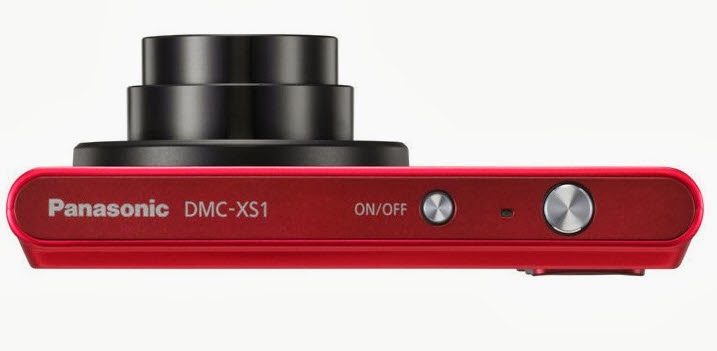
My Test Video of Panasonic DMC-XS1

I confess, I was in a vulnerable state. I didn't intend to buy the Panasonic DMC-XS1. But it was a long day. I felt a longing. Somehow I found myself in the camera store; reminiscing about D-76. Peeping at the DSLRs that I will never own. Sigh.

The store clerk asked "May I help you?"

Next thing I knew I was walking out the door with that new camera in the hand feeling.  When I got home and opened the box I was really surprised how small the camera was in my hand.


This is a test video from the camera. No filters were used. No macro mode to speak of. I have to say my expectations were guarded. Still have painful memories of that Fuji camera from long ago.


I read some of the reviews of other users. Some folks were not happy with the performance.

That might have been due to the type of memory card used;  a Class 2 card ain't gonna cut it. It should be functional at Class 4 but I would expect recording delays. I had no problems starting and stopping with the Class 10 card.

It isn't perfect. I haven't found a comfortable way to securely hold on to the camera. You want to put that strap on it. It won't take much effort for the camera to slip out of your hands.

Even with the limited time that I had to squeezed out of the day, I'm pleased that my effort to record moving people and objects was a good investment.


Other Posts of Interest

Monday, September 23, 2013

Quick Look at Panasonic DMC-XS1 for Video

The Panasonic DMC-XS1 is a point and shoot camera that records in 720p, is about as thin as a phone and the price point is very affordable to Frugalistas. 


I'm not in lust with it but I do like it. First, let's look at some of the video relevant specs:

Aperture is f/2.8 to f/6.9 This camera will do well in most daylight recording situations and okay indoors if there is enough light.

If you engage the telephoto lens the aperture/iris closes down to about f/6.9. If you are outside in bright sunlight not a real problem but indoors it could be an issue.

5x Optical Zoom, very acceptable for a camera this size and this thin. How thin?


Yes, that thin. This camera does have optical image stabilization for minor hand tremors but for long term recording you'll need a tripod or other type of support.

Focal Length - I normally don't mention focal length but this camera lens has the ability to record wide angle videos. The wide angle for video is 26mm to 130mm for telephoto. If you are into real estate photography, nature, architectural videos or you are taking video of the team this rascal can do it.

Recording Media is a Micro SDHC card. I have a box full of standard SDHC cards. I get grippy when I have to buy MicroSDHC cards.

Video Recording Format Motion JPEG in the QuickTime MOV format. Almost every video editor can accept the MOV format.

I did say almost.

Those of you using Windows Live Movie Maker and earlier versions of the videos editing software are going to have issues. Issues as in problems importing video. Windows Movie Maker cannot import MOV files. Windows Live Movie Maker can import .MP4 video but I have my doubts about MOVs.

You can record in 720p high definition or 480p standard definition down to old school 320 x 240. Please don't record in 320x240.

Audio records in Mono and if you use that zoom lens during recording it will pick up the sound of motion of the zoom. Which is why you don't want to zoom during a live recording.

Camera body comes in silver, black or red. The price points I have seen in local ads and the Internet is between $79 to $99 before tax.

So Who Is This Camera For?

To be honest, the specs read like 2011. Still, I think this could be attractive to folks that have a legitimate need for wide angle lens video recording.

I also think it is a functional day to day camera/camcorder without the bulk. If you don't want your phone to be your camera this is a good option.

If you are doing only web based video, can live with it recording in Motion JPEG/MOV then this is a good affordable camera.

Small size, 5x optical zoom and under $100.

I can't kick about it.

Other Posts of Interest

Sunday, September 8, 2013

Aperture - VidGeeky Word of the Day

Let there be light and enough of it. If you have a recording device the one this you need to understand knowing when you have enough light to record video.

Before you can answer that question, you need to understand about aperture and f/stops. This is a brief introduction.

I am going for concept and not necessarily the most technically accurate explanation. In addition, there are a lot a factors that can affect the quality of a recording. The size of the image sensor, distance, the type of light and the diameter of your lens all play a factor in making a quality video.

Example of an adjustable aperture in a lens

I want to focus on this one aspect of recording that can solve a lot of video exposure problems.

What Is Aperture?

Aperture is the opening your camera or recording devices lens uses to allow light to make contact with film or an image sensor.

Sometimes aperture is referred to as the iris of the lens but no matter which term is used the concept is the same; it is the size of the opening that allows light to pass through to make a recording.

This is where it gets a little confusing but it will make sense in a moment.

 
F/Stop Scale from Wikipedia

The wider the aperture the more light comes into the device. The smaller the aperture the less light comes into the device. That makes sense.

The scale used to describe the opening of the aperture is called an f/stop. This is where it gets a little dippy.

The smaller the f/stop number the bigger the opening.  f/1.4 is twice as large as f/2.8. Or the other way to think about it, f/2.8 allows half as much light as f/1.4.

F/2 allows twice as much light as f/4. Or f/4 allows half the amount of light as f/2.

Fixed and Adjustable Aperture

There are two types of apertures; a fixed aperture and an adjustable aperture.

On smartphones and tablets it is a fixed aperture; generally around f/2.4 and higher. Consumer level camcorders also have a fixed aperture. Camcorder users might have a work around that  smartphone/tablet users do not have but you still need to be aware of your lighting conditions.

Standard digital cameras that record videos, Micro 4/3 Cameras and DSL Cameras have adjustable apertures. You can select the most appropriate f/stop for your situation but some of those cameras don't allow adjustments as you are recording video.

Yeah, So?

Be aware of the light around you and your recording device ability. It will help you make a better video. If your smartphone has an aperture of f/2.8 and your are recording indoors with a single light bulb that isn't going to be a very good recording.  At f/4 it might not even be visible.

Standard camcorder outside in bright sun with an f/2 lens might be too much of a good thing. On a cloudy day it could be perfect. You might have to make location or other types of adjustments.

Digital cameras that record video, Micro 4/3 Cameras and DSL Cameras have adjustable apertures. You can select the most appropriate lighting for your situation but some of those cameras don't allow adjustments as your are recording video.

Know what your equipment can do.

Other Posts of Interest

Wednesday, July 31, 2013

Quick Look at Nokia 1020 Camera Phone for Video

It has been awhile since I have written about a recording device. When the point and share camcorder line was kicked to the curb by smartphone technology that forced me to make adjustments.

I can't freely use the word camcorder unless I'm talking about a dedicated device. I've been using the term recording device to cover smartphones and tablets, applications, still digital cameras and camcorders.


With the Windows Phone 8 Nokia 1020 camera with smartphone capabilities I'm pushed further across the line only I don't know where the line is anymore.

I feel the longing building up in me. I don't want to want it. But I do. I just do.

Before I go on a drool fest, here are the relevant specs:

Video Primary Camera: f/2.2 aperture (maximum lens opening) 1080p recording 30 frame per second recording .mp4 H.264 There is a 6x zoom but it is unclear if it is optical or digital. Optical image stabilization and auto focus.

Secondary Camera: 720p at .mp4 H.264 with an f/2.4 aperture.

Sensor: 1/1.5 inches with 41 megapixels saving in jpeg format.

Processor: Qualcomm Snapdragon™ S4 Dual-core 1.5 GHz Not going to be sluggish but Quad-core would be better.

Memory: Internal 2 GB, SD Card 32 GB and 7 GB Microsoft Cloud Storage. With the size of the photos and videos this thing can churn you are going to need all that you can get and then some.

Why Do I Want It?

It really is a camera. There are quirks in the interface from what I can tell from a distance but there are possibilities here.

It is the right size, has the right number of megapixels if I need to crop a photo to a certain area. With an attachment I can hold it like a camera. Record and store remotely; this could be a keeper in certain citizen journalism/police recording situations.

I have an Android tablet and my Android phone is way over its freshness date. I'm willing to give this a look-see and fair consideration.


Other Posts of Interest

Tuesday, April 30, 2013

The Shift in the Force - Blackmagic Pocket Cinema Camera

I haven't done a camcorder or camera review lately. There wasn't anything that caught my eye, made me flutter or cause me to re-check the bank account for permission. Smartphones decimated the Point and Share category.

Standard camcorders are evolving slowly but manufacturers are not innovating. The sensor is still tiny and no major vendor is going to innovate without cash money assurance that it will be successful. That isn't how innovation works.

My ennui was so bad I was walking past clearance camcorders with a disinterested glance.

And then, my eyes cast upon this beauty and my heart began to sing again. This is the Blackmagic Pocket Cinema Camera.


It is not a digital still camera. It records video.
It is the size of a Micro 4/3 camera and can take those lens too.
It has a sensor about the size of a 16mm camera. We are talking a huge honking sensor in the size of a compact camera body.

External mic jack, yes.
HDMI out, yes
Standard battery, yes.

You can record video in ProRes 422 or CinemaDNG RAW and then go where you want with it.

Is it a consumer level camera? No not really. It is $995 to start and that doesn't include a lens. You would have to make sure that you have a pro-level video editing software that can accept the video like Final Cut Pro, Sony Pro line of video editing software, AVID; stuff like that.

You will be investing in new storage options cuz this camera demands it.

It is a game changer because if the video and form factor works there is gonna be a bum rush by manufactures to clone or be inspired to create their own version of this camera.  And they will have to do it at either a lower price point or up the quality by +3.

Either way, the professionals and those of us on the other side will be the winners. Video from this camera will be in commercials, demos and feature films. It is small, light and on the pro side of the fence inexpensive.

Hell yeah I want it but I don't need it just yet. I'm in observation mode. I need to know that it isn't vaporware or a marketing person getting ahead of R&D.

If you want to take a look at video shot with this device check out John Browley's recording of a local farmer's market. It is after he processed it. You can view the ungraded version as well.

Might have to start counting pennies, just in case.

Monday, April 15, 2013

Adjusting the Microphone Recording Levels in Windows

My first experience with my new microphone reminds me to not assume that installing a piece of hardware is always the same way each and every time. I have seen comments from other people with similar products that complain about the low levels and return the product.

We all wish for a perfect streamline plug and play experience; most of the time it just doesn't happen that way. 


This is a video I created on adjusting the recording audio levels for microphone use for Windows Vista and Windows 7 users. If you are going to record audio for your video you want to be aware of this adjustment.

Other Posts Of Interest

Tuesday, March 26, 2013

Paolo Tosolini's Mobile Gear Tips Video

I truly believe in cross pollination. I'll peep over at the education communities, gaming video creators and ProAm videomakers.

I'm not picky.

Over in the corporate training communities there are folks that are finding ways to solve the problems of stabilization and quality recording.


This is a video by Paolo Tosolini, who helps organizations on creating content. He has a good mixture of affordable and functional ideas if you want to use a smartphone or mobile device for recording.

On his blog there is a good post on what you need to set up a mobile video kit.

Each one teach one.


Other Posts of Interest

Sunday, December 23, 2012

Eclipse T2810C Media Player Video Review

I do go on and on about buying cheap camcorders and recording devices. With a little time and research you can do better. This is my meager effort to take the hit for the team in order to reinforce a basic concept; research before you buy.

In today’s tale of woe, I want to talk about multifunctional devices. There are media players, smartphones and tablets. The promise is that the device can do a lot of tasks in a singular form factor.
Note I said, the promise. The reality is that it does one thing very well, two things acceptable and the rest is crap that you can live without.

I was in a brick and mortar establishment just walking around excluding things I don’t want to buy. I walk past the Eclipse T2810C. I tend to do that when electronics are encased in pink. I used to like pink as a child. I sometimes wear pink clothing as an adult.

I don’t want every item in my world to be pink. That is just me. I know some folks really do have a pink existence. More power to them.  I don’t want to walk around with a pink camcorder type device.

This is not a camcorder. This is an mp3 player with the ability to record video.


I thought about it; who is the target buyer for that device?  Girl people. Young girl people who might see the words camcorder and think that they are getting a deal. Or worse, their mothers, aunts and grandmothers who think this is a good gift for the girl child.

Bad thinking frugalistas, very bad.

Let’s Look at the Specs

  • 1.3 Megapixel camera/camcorder
  • 15 frames per second
  • AVI video format
  • Per the ad,  copy you can record 8 hours of video (the devil is in the details)
  • 4GB on on-board storage with the ability to add a microSD card for additional storage.
This is what it looks like in reality:


Some like it small and if you do then 320x240 ought to be the ticket for you. Yes, that is how you get 8 hours of video on a 4GB internal storage card.

If you like jumpy, grainy standard definition video that is in the 4:3 aspect ratio then this is the device for you. And that chugging sound you hear is not my neighbors air condition unit.  That is the sound of the on-board mic picking up the sound of recording the video.

This is Not A Hate Piece


As a mp3 player for $20 it does the job, once you get past the resistive touch screen. There is an included pointer to help with that but even with the pointer it is a challenge. The sucker puts up an active resistance to function. And if you have medium to large fingers you will have issues.

They are three videos that are included with the device, a group of country western singers that are not bad or offensive. I’m not a fan of modern country music or what passes for it but this ain’t bad. Those video display just fine.

But that is not why we are here. I would say that this is more along the lines of a Helga type of recording experience. I think with its extreme limitations in mind you could craft something unique.
You’d have to work dang hard at it but it could be done.

For normal day to day recording, no.
For memory keeping, hell no.
For experimental art, creativity and stuff like that…maybe.

So if you are standing in Sears, Wal-Mart, K-Mart or some other store and you think this would be a good gift then think again and move on. For the record, it does not matter if it is pink, blue or black. It is what it is.

If you are a video creative who lusted over the PXL-2000 and want to relive past glory then this is about as close as you are gonna get. I think the PXL-2000 video quality (black, white and silver) may have a slide edge over the Eclipse.


Other Posts of Interest

Monday, December 10, 2012

Bill Gentile and His Video Backpack Gear

Bill Gentile is a professional journalist who is also a teacher/trainer. This is a great opportunity to peep into his gear bag and check out what he totes when he is on assignment.


Checking out his blog, there will be a new book in January called Video Journalism Field Manual that can be purchased on Amazon.com.

Other Posts of Interest:

Thursday, December 6, 2012

Quick Look at JVC GZ- VX700

Retail stores can't carry everything which is why I like to go directly to a vendor web site to check out the action. The JVC GZ-VX700 has what most people want, a small body, touch screen and a better ability to record in low light situations.

Yes sir, that F1.2 lens on a camcorder is going to allow you to record indoors, in challenging lighting situations. Don't expect crystal clarity but it will give you a bit more wiggle to get the shot.

Provided that you don't wiggle. Or move. Or jiggle.

I like to look at the specifications of a device but this time let's look at the specs m via the icons that will be on the box.

Starting from the top left corner:

WiFi - this device can used as a WiFi transmitter. You can download an Android or iOS app to use this camcorder to transmit video to your phone or tablet.

You could also transfer the video to your video distribution service. If you have sufficient bandwidth.

Full HD - this camcorder records in 1920x1080p

1080p Output - This seems redundant.

AVCHD - videos are recorded in this format. Most of the current video editing programs now accept AVCHD so this should no longer be an issue. If you have an older video editing program then it may or many not recognize this file format.

Super LoLux - JVC states that their sensor is"back illuminated" to provide better low light recording. The sensor is a receiver of light. The sensor worth with the lens.

F1.2 Lens - the lens is the pipeline that the light moves through to hit the sensor. Keep in mind, this is a small device. The sensor isn't that big to begin with so the lens on this camcorder is a help but it can't work total miracles.

O.I.S. - Optical Image Stabilization - yes, this can be a help to steady hand motion while holding the device. It won't eliminate it. If you are recording a dance or sporting event you are gonna want a tripod.

Advance Image Stabilization -  probably their term for digital image stabilization. For distance recordings you still are gonna need a tripod.

Frameless Touch Panel LCD - all of the controls are touch based. 

Wide Angle - This lens has a 38mm wide angle view making it easy to compose group shots and to record urban canyons of skyscrapers. Or mountains. What ever floats your boat.

Intelligent Audio - the device figures out the best way to record audio for the environment.

Face Recognition - point a face at it and it will make sure it is in focus.

LED Light - it could help but unless you are miner 49 I'd wouldn't use it. It might be too much or not enough. There is no way to adjust the light so you take your chances.

HD/SD Recording - this is a a feature most camcorder have had for years now.

SD Memory Cards - SDXC, SDHC and you really don't want to use a SD card in this but you can.

HDMI - can be used with HDMI devices

K2 Technology - their proprietary software that is suppose to restore audio after compression.

Once you filter of the marking gunk this is a good camcorder. I can see it for families that are active, group activities, for educational use, or just in time recording. For those people recording real estate for landscape type videos the wide angel capability of the lens is a definite plus.

It does have an 10x optical zoom so that works for me. I'm not a fan of touch screens so I bring that bias to the table but others love them. I'd say if you are making a transition from recording on your phone to this device then this is a good option.

At $399 it is a bit pricey but if you can make the Wi-Fi thing work for you then it might be a good investment.

Other Posts of Interests

Wednesday, November 28, 2012

YouTube Space Opens in Los Angeles

If you are a serious or want to be serious YouTube content provider then you are about to fan yourself. There is a new production studio in the Playa Vista area of Los Angeles.  I'm talking 41,000 square feet of commitment and cash money on the barrel head of "Let's do this."

YouTube Space Los Angeles


This is serious business, with editing bays, equipment, studios, help and support. It is free but not anybody can stroll in the door.

You have to apply, be selected and become a member of the Partner program. If you can prove you got the chops you get to romp around the studio.

Another way you can gain entry into the production studio is by attending events, workshops and classes that will be held at the facility. Those types of events will be open to the general YouTube community and other folks.

For more information visit the YouTube Space LA page.


Other Posts of Interests

Thursday, November 15, 2012

Vivitar DVD 426HD Under $50 Camcorder Review

Yea, verily we go about as low (in term of price) as I thought possible. For the record, I don't think you should buy anything just because it is inexpensive.

There is value, there is frugality and then there is throwing money away.  I am against buying bad stuff. I am in favor of buying good stuff at a fair or good price.


I've seen this rascal in a circular or two. Off to the side trying to be inconspicuous. $19 for an HD camcorder. Regularly $29.99. These are gonna go quick no matter what I say but I gotta give it a try.

Once again, the name Vivitar is licensed from the original photography company. They have nothing to do with this item. In fact the company does not exist any more.

The Specs

It is small. The LCD display monitor is even smaller at 1.8 inches.
  • Video Recording in HD720p, VGA 640x480 and old school 320x240
  • Video Format AVI (what flavor of .avi is unknown)
  • Lens F/Stop 2.8
  • Photos up to 3MB JPEG
  • 4X Digital Zoom
  • SD type Memory Card up to 16GB
  • Runs on 3AAA batteries
This seems to be compatible with both Mac and PC operating systems.

My Thoughts? 

How can I say this? On the surface it seems like this should be a keeper. The price is right and golly gee it does HD. I've had prior experience with a cheap Vivitar camcorder. Mine worked for maybe a week or so when it gave itself to the hereafter.

Dig deeper my friends.

The camcorder is small. The sensor is even smaller. The shininess of the plastic does not mean it is a quality product. The plastic buttons may be hard to activate.You might not even be able to see the LCD screen in very bright light.

And that is the only way you are going to get a good recording; you will need to be outside. Indoors it is gonna be bad. Grainy at best.

Modern camcorder record in the .mp4 file format for a reason. It ensures a certain level of video quality in an acceptable file size. This device records in .avi video; which is an older video format. You are not going to get the same level of quality.

It won't be crystal clear. It won't have good color rendition. The sensor is so small there is only so much data it can accept. Not to mention a plastic lens. Or the very small lens opening.

A gentleman by the YouTube user name of Carolina Venom has much to say about the little darling. Heed that man's words. If you see a love one in the store with this in their hands lovingly take it away.

Buy It or Not?

Not. You can do better.


Other Posts of Interest