Showing posts with label Videoblogging. Show all posts

Friday, July 23, 2021

Tip a Glass to Vegas Movie Studio - RIP

One of the long time greats of video editing is being retired. The consumer level Vegas Movie Studio line of video editing products is cancelled. 

That product line is history.

For those that have Vegas Movie Studio and Vegas Movie Studio Platinum there are options.

  • Continue to use what you have. The program still works and will for a while longer.
  • Move up to Vegas Pro, which is being continued at the moment.
  • Move over to the Magix line of video editing products.
  • Find another video editing software.

Doctor Zen gives a complete breakdown of the change of what is going on.


What the heck happened?


Most this this is unconfirmed. Talk about being in the weeds looking for a ball.

Tech Dive also has a video about the situation.

The company that works on updating the Vegas line of products decided to stop supporting Vegas Movie Studio software. They want to concentrate on Vegas Pro. That software is going to be continuing and will be supported.

The parent company is Magix. They have a line of video editing software known in Europe as Movie Maker Pro or Video Deluxe.

Magix or the Vegas programmers should have been straight up honest and told folks that Vegas Movie Studio and Studio Premium are being discontinued. 

And, 

If you would like to check out our other line of video editing software we have an entry level product called Movie Edit Pro.

If they would have done that, few people would have kicked up a fuss about it.

But that isn't what they did...

They re-named their European consumer friendly editing software as Movie Studio 18.

If a user paid for the upgrade and discovered that it was another product, Magix won't give a refund.

Unless the user lives in the European Union.

I don't know what they call it in the EU, but around these parts that is known as a bait and switch. Not good business practice and illegal as hell.

The way it is being done is the skank part.

I'm a current customer of Magix. I use some of their other software. Honestly, I think this is a marketing plan that went so bad, so fast.

If they make a change or correction, I'll post about it.

You can still get support. You can visit the Vegas Creatives Support Group.

Again, you don't have to do anything at the moment. Your software will work. You can also upgrade to Vegas Pro, it has similar features and interface. 

Otherwise, it is Taps for an oldie but a good piece of software.

Sunday, July 18, 2021

Jumprope App - Creating How-To Guides

October 2021 Update: Toot the horn folks - Jumprope is no more. Kicked the bucket a few months ago. I really like the focus on making it super easy to create a tutorial. Ah well, they come and they go.

Historical Page of the Deceased App

There are some of us that honestly just like to share what we know. But there is a gowning media market regarding selling via education type products. Nothing wrong with that. People have been doing it for centuries.

The tech has changed but the desire to share what we know is in our blood. One of the companies that make it easy to create education products is called Jumprope. Users can create educational guides that can be shared on social media or on a blog or website. 

The How-To guides can be:

  • Photos with captions
  • Photos with audio
  • Photos and video
  • Video with captions

How it Works

This is an example video from the company explaining how to create a guide.


What You Will Need

For creating a Jumprope guide, mobile users will need to download the app via Apple App Store or Google Play.

Devices

Android phones and tablets running Android 6.0 or higher.

Apple phones and tablets running iOS 11.0 or higher.

Desktop Browsers: you can view Jumprope guides via any browser but you cannot create them.

What Can You Do With a Jumprope Guide:

  • Quickly create how guides and videos.
  • Use it to demonstrate skills and expertise.
  • Use it as a means to generate income with affiliate links to the products used in the guide.
  • Repurpose prior content.
It is one of the quickest ways to create educational type content. 

It is bone easy to do and it cost you nothing to check it out.


Tuesday, May 25, 2021

A Look at Animotica - Quick Tools

There are people that want a basic video editing software and don't want to use their phone or tablet. 

Or can't. 

This includes a lot of Windows and Android users who haven't found what they need in terms of an app or software.. 

Animotica is an affordable video editing software that has a easy user experience, social media export options and being able to see a full size rendition. Animotica comes in three versions, Free, Lite and Pro. 

In this post, I want to take a look at the Quick Tools section. There are some goodies.

What You Will Need

Familiar with navigating to folders on your computer. Drag and Drop or knowing how to find a file or folder on your computer.

Understanding that this is a basic video editor that does a lot of things. Some you want, some you don't.

If you do have audio or video on your mobile device, knowing how to transfer it to your desktop.

Devices

Windows 10 only.

Might work on a large size Windows tablets.

Disclosure

I purchased the full version of the software last year. Some of the items displayed on my screenshots may or many not be available to Animotica Free or Lite users.

Also, I have a heck of a lot of software. I have a problem. I know it.

Quick Tools

This is the dashboard of the software. There is a lot of useful stuff, some of it accessible to free users.

Animotica Dashboard

Among the tasty treats are things that come up when you need them. Who among us hasn't had the need to extract a mp3 from a video:

Or  need to only add background music:


And this is probably the time to mention the payment plan and functions.

Free Plan:
  • Access to the basic program features
  • Can freely switch between aspect ratios
  • Export in 720p
  • Limited transitions, stickers and effects
  • Videos are watermarked.

Lite Plan:

All of the features of the Free Plan plus
  • Access to all transitions
  • Export in 1080p
  • No watermark.


Pro Plan:

All of the features of the prior two plans:
  • Access to all transitions, overlays, animated gifs and effects
  • Export in 4K
  • Color adjustment, correction and effects
  • Animated text effects.

I usually mention payments options toward the end of a post. But I know how some of you think. 

"Ah, I just want to trim my video. And it will do it for free? Score!" 

You will be able to do that. But under the free version, your video will export as 720p with a watermark.

This is why reading is fundamental. 

Now this is just the Quick Tools section, not the main video editing program.  


If you are interested in that, check out the above video. Animotica straddle the fence about being an entry level video editing program with some decent features. 

It isn't for the person that want or needs something like Hit Film or DaVinci Resolve. But if you need something that can get the job done at an affordable price, this might be something to examine for your needs.


Monday, May 10, 2021

Ecrett Music - AI Music at Your Fingertips

There are all kinds of music generators. Some require a tiny bit of music knowledge from the users and others allow you to take an existing work and customize it to a unique royalty-free tune.

Ecrett Music is a service that allows you to customize music using AI and then use it in your content. 

This is a demo created by the company:


Basically, you select the the features you want in your music, such as setting, mood and type of music. Hit the create button and you have a tune for your video or podcast. 

If you like it, you can do more tweaking with the length and other enhancements. 

Who is this Service For?

Podcasters who want to create but don't have music skills. They know what they like and don't like. Just can't create it.

Gamers who need background music or game programmers that want to test things out.

Video creators that need a variety of tunes on a regular basis and are not wealthy. 

Some Concerns

A little digging kind of answered some of my concerns.

  • You do not own the music. You are given a license to use the music generated by the service. The music is owned by the parent company Soundraw.
  • As a free user, you can't use the music for any reason or purpose other than evaluate the service.
  • If you decide to cancel the service, you still retain usage of music you downloaded to your device. But you will no longer have access to music you did not download before cancellation.
  • More info can be found on their terms of service page.

Pricing Plans

Ecrett Music is one of the most affordable plans I've seen for AI Royalty Free music. There is a free plan to test out the service however, you can't do anything with it. 

Zippo. Nada. Nothing but evaluate the service. And if you do the words "liable" appear some place on the website. 

If you sign up for the annual subscription rate it is $5 a month. $60 a year for an individual creator. 

If you are a business creator rate $20 a month and $240 a year. For full, unrestricted access.

So it is a winner?

Not prepared to go that far. On the surface it seems okay. It is all I can do not to whip out the card. 

Ecrett Music provides a template that locks you into viable options to create music. This isn't a bad thing, especially if you have no music training. And you can quickly have what you want within a couple of clicks. That is remarkable.

Most of the current AI services use humans to create the foundation for the AI composed music. The AI makes alterations to create unique tunes. But there is no Bippity Bop. No swangg. There is something I can hear when I listen to AI music. Or what I don't hear. 

Background music shouldn't have that much oomf, if any. I understand that. But I can here the void. Not hating on this company or any AI music company. It is a subjective feeling of the tunes musically needs some salt or a touch of cayenne. 

You might feel differently about it.

You are not going to score a major motion picture with this service. But for users who are on a budget or want to experiment with crafting tunes for social media, this could be a keeper. 

Monday, April 12, 2021

What is Mixkit?

Mixkit It is a freemium royalty free service that is connected to their parent company Envato Elements. On this section the website you download and use assets like music, sound effects, video and more.


Mixkit License Screen


As usual in the freemium space, there are usage terms and conditions. And there are different license rules depending on what you download. Pay attention before use can save you some grief. I'm focusing on the music and stock video but they have other free assets that might be of interest to the social media creators of the world.

For music, you can use the assets in podcasts and YouTube videos.  However, they don't want you to do anything "naughty" or hate based with their stuff. That is a standard requests from most of the music and video services. 

How that gets defined is up to them. Doing a historical review of women's underclothing is one thing. Doing a historical review of stripper panties with the stripper in them is another. They may or may not want their music associated with that particular audio or video essay.

It's all subjective. And in this case, geographic. 

The company is located in Australia. For (some thick headed) Americans (yeah, I said it.) that means if there is a problem or issue you would be dealing with the Australian legal system.

Music


There are 24 songs per category. One of the things I like is that there is a direct download. No signing in or registering.

The download format for music is mp3. You will get a pop-up notice about buying unlimited via Envato Essentials. I'm not bothered by that; I'm not going to download every piece of music that they have. 

Most of the tunes are under three minutes and would be best suited for intros and bumpers.

Video


The video clips are available for both personal and commercial re-use per the license statement. 

However when I clicked on the spinning hamburger there was the 4K paid version and a 720p version that states it is for personal only use.

I did find a fish video with the fixing for ceviche. That one was unrestricted with a 1080p downloadable version.


Which leads me to the bug-a-boo. There is a section that does have free video downloads. And there is a restricted video license for other videos. 

I'm real sure I clicked the free one. I landed on a restricted burger video.

Check and double check the asset you select.

Another concern is YouTube. The bots are running hot and heavy over the service. If you have a problem or get a strike you've got an issue. 

Mixkit does provide their email address. They will do what they can. But you didn't pay them. They don't have to help you clear the strike. And the more folks use their free version of the service the greater the potential for a strike.

Summary


The service does provide free assets. I think to be fair about it you should probably give them attribution when it comes to using their music. It might help to acknowledge that is where you got the music or video from the site. 

It would also be a good idea to make a copy of the license page with the date that you printed or made a PDF of it. Because terms can change and you want to prove you were operating in good faith at the time of the download.

The video side is a bit tricky. You have to be aware of what you are clicking on to be on the safe side. 

Check it out and see if it is a match for you.

Saturday, March 6, 2021

David Lee King's Primer on Web Video

Update 2021 This is a very old post that leaped forward in time. I found the slide dead and was fixing things. This happened. I'm actually working on a project for podcasting audiograms. But from the early days some things stay the same.

David Lee King is a librarian and a videoblogger. This is a slide presentation on what web video is, what you need to get started and for those on the book beat how can it used to support the library's mission. 


Saturday, December 21, 2019

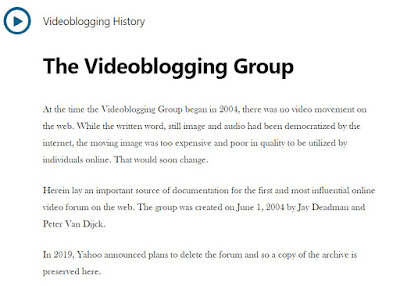
Yahoo Videoblogging Group History Archive

The current owners of Yahoo have closed the Yahoo groups and deleted the content of pioneers from multiple disciplines. It has happen before and it will happen again.

Long before Vimeo, long before YouTube there were people figuring out how to post video on the early days of the internet.

Some were artists.

Some were tech heads.

A lot of folks had porn as their motivation; meaning there were dozens of postage stamp clips of pre-existing content that found their way into content communities. So I have been told.

And then there were these folks; The Yahoo Videoblogging Group.


 Orginal Yahoo Videoblogging Group Home Page


However, this time the text content was saved for those that will want to know.

There was news content. There was humor. Documentation of life and more.

All of it funded by individuals and those people that are always willing to go out on a limb.

So, yeah. We did it for Johnny.

Memories.


Friday, November 15, 2013

Rediscovering and Recycling or Think Before You Speak

I am doing a search and rescue mission of finding my videos. Now that my Blip.tv web hosting days are over I've got to transfer a lot of video. This also provides and opportunity to upload unused recordings and clean up the ones I had originally posted.


For example, this is a short clip from the 2011 Blogging While Brown Conference. It is hard to see improvement because of the YouTube compression but I was able to get the colors a bit more accurate.

I'm still on dicey Wi-Fi so I really do have to upload short videos. This forces me to edit and edit tight.

Let me see, anything else. Oh yeah, the topic of this clip is a response to a question from the audience about is there something that you regret saying on camera. I think Lydia makes a very good point. You can yank the video down but if someone snags a copy it will never go away.


Other Posts of Interests

Sunday, October 27, 2013

Paris to New York - Serious Videoblogging

I was reading a post a couple of hours ago talking about how people are seriously juicing over the new camera equipment being available. 4K is almost passe. 6K and 8K cameras are on the cusp of emergence.

As if a camera alone is what makes a good video or movie. It can help, if you know what to do with it. Citizen Kane was shot on analog equipment.

This is a video by Casey Neistat


I think skills and the right tools are important. But heart pumping to the brain on what you want to say or accomplish is far more important. I don't care if it is with a Smartphone or a 4K Red.

Craft and storytelling. Getting it done. Making that connection.

For more info on Casey check out his YouTube channel


Other Posts of Interest

Wednesday, September 25, 2013

My Test Video of Panasonic DMC-XS1

I confess, I was in a vulnerable state. I didn't intend to buy the Panasonic DMC-XS1. But it was a long day. I felt a longing. Somehow I found myself in the camera store; reminiscing about D-76. Peeping at the DSLRs that I will never own. Sigh.

The store clerk asked "May I help you?"

Next thing I knew I was walking out the door with that new camera in the hand feeling.  When I got home and opened the box I was really surprised how small the camera was in my hand.


This is a test video from the camera. No filters were used. No macro mode to speak of. I have to say my expectations were guarded. Still have painful memories of that Fuji camera from long ago.


I read some of the reviews of other users. Some folks were not happy with the performance.

That might have been due to the type of memory card used;  a Class 2 card ain't gonna cut it. It should be functional at Class 4 but I would expect recording delays. I had no problems starting and stopping with the Class 10 card.

It isn't perfect. I haven't found a comfortable way to securely hold on to the camera. You want to put that strap on it. It won't take much effort for the camera to slip out of your hands.

Even with the limited time that I had to squeezed out of the day, I'm pleased that my effort to record moving people and objects was a good investment.


Other Posts of Interest

Monday, September 23, 2013

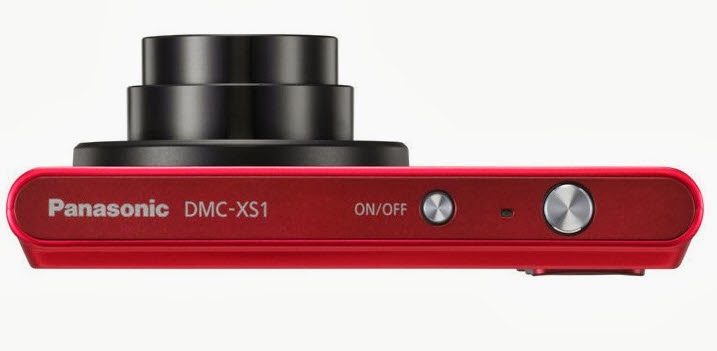
Quick Look at Panasonic DMC-XS1 for Video

The Panasonic DMC-XS1 is a point and shoot camera that records in 720p, is about as thin as a phone and the price point is very affordable to Frugalistas. 


I'm not in lust with it but I do like it. First, let's look at some of the video relevant specs:

Aperture is f/2.8 to f/6.9 This camera will do well in most daylight recording situations and okay indoors if there is enough light.

If you engage the telephoto lens the aperture/iris closes down to about f/6.9. If you are outside in bright sunlight not a real problem but indoors it could be an issue.

5x Optical Zoom, very acceptable for a camera this size and this thin. How thin?


Yes, that thin. This camera does have optical image stabilization for minor hand tremors but for long term recording you'll need a tripod or other type of support.

Focal Length - I normally don't mention focal length but this camera lens has the ability to record wide angle videos. The wide angle for video is 26mm to 130mm for telephoto. If you are into real estate photography, nature, architectural videos or you are taking video of the team this rascal can do it.

Recording Media is a Micro SDHC card. I have a box full of standard SDHC cards. I get grippy when I have to buy MicroSDHC cards.

Video Recording Format Motion JPEG in the QuickTime MOV format. Almost every video editor can accept the MOV format.

I did say almost.

Those of you using Windows Live Movie Maker and earlier versions of the videos editing software are going to have issues. Issues as in problems importing video. Windows Movie Maker cannot import MOV files. Windows Live Movie Maker can import .MP4 video but I have my doubts about MOVs.

You can record in 720p high definition or 480p standard definition down to old school 320 x 240. Please don't record in 320x240.

Audio records in Mono and if you use that zoom lens during recording it will pick up the sound of motion of the zoom. Which is why you don't want to zoom during a live recording.

Camera body comes in silver, black or red. The price points I have seen in local ads and the Internet is between $79 to $99 before tax.

So Who Is This Camera For?

To be honest, the specs read like 2011. Still, I think this could be attractive to folks that have a legitimate need for wide angle lens video recording.

I also think it is a functional day to day camera/camcorder without the bulk. If you don't want your phone to be your camera this is a good option.

If you are doing only web based video, can live with it recording in Motion JPEG/MOV then this is a good affordable camera.

Small size, 5x optical zoom and under $100.

I can't kick about it.

Other Posts of Interest

Saturday, September 21, 2013

Collaborative Remix Documentary Project at HitRECord

The future is a remix of the past; everything we known is a re-working of another persons content. Today we call it re-mixing.

There is a new project from HitRECord community asking some very interesting questions. Joseph Gordon-Levitt is reaching out to videobloggers and all other creatives to help create a short form documentary on what it is to remix.


The above video is a discussion with Jay Smooth about the nature of remix, how it applies to the hip-hop community and to creatives everywhere.

Can't have a discussion about remixing without a mention of the current restrictive copyright laws that do not accommodate the (U.S.) founding fathers intent to allow for the public domain use of content.

If you are interested in participating in the documentary you should slide on over to project page and put in your two cents or at least answer the three questions posted on the site.

Other Posts of Interest:

Thursday, June 27, 2013

Citizen News Using Vine Videos

It has been a heck of a week. The news events of the past three days in the United States (and I use that term loosely) has been incredible. I just wanted to mention how Vine was used to report a specific event in Austin, Texas.


This is one of many Vine videos that were recorded to document the events in the Texas State Senate. There may have been local reporters and journalists there but many of the videos were recorded with Smartphone devices.

I bring this up because none of the nation news media mentioned, looked at or even acknowledge the 13 hour filibuster of State Senator Wendy Davis. CNN went with cupcakes, I believe.

The filibuster lasted 13+ hours; you'd think any one of the broadcast or cable news channels could have mention it with a 30 second status clip per hour? Naw, that would get in the way of some D list celebrity PR problems.

Many people watched parts of the event via YouTube Livestream in addition to the Vine video recordings. There was also UStream reporting.

Now, I am not suggesting that mainstream media use Smartphones as reporting tools. Goodness knows I disagree with the Chicago Sun-Times decision to fire their entire photography staff. Look at the results of that boner.

But if the mainstream news media choose to ignore major relevants news stores then we shall pick up the slack.

It is on.

Other Posts of Interest

Tuesday, April 16, 2013

Vine Used as Reporting Tool

I told folks this would happen. Vine is not just for cute cat and bad dog videos. I have seen people use the Twitter Vine video app for creativity but it was a matter of time before it would be used for reporting and journalism.


Some of the explosions at the Boston Marathon were transmitted by Vine to folks outside of the Boston media area. Twitter got it before network news. Other Vine videos, like the one above by Anne London, was keeping track of runners entering the area and being stopped.

It bears repeating that we are in new territory here. The man or woman on the street will be the one to possibly record an essential part of the event or how it plays out.

Once again, be safe and be aware of your surroundings.


Other Post of Interest

Sunday, March 17, 2013

Are You Going to VloggerFair 2013?

Just found out about this in my Twitter stream. Chris Pirillo is a tech writer and vlogger. I was reading Lockergnome before there was YouTube.


http://www.vloggerfair.com

Chris is having a meet-up in June for those that create videos and who watch web based videos.  The list of topics is very interesting.

If you are in the Pacific Northwest area of the United States or want to visit that part of the country you might want to slide on over to the VloggerFair website. There will be workshops, meetings, and yakking it up with fellow creators and viewers.

At $29 for the introductory price of admission this is one of the more affordable conference/meet-ups you are gonna find. The price will change.

Other Posts of Interest

Sunday, November 25, 2012

Do It Now - VidCon 2013 Early Registration

I was a sad, lonely person last year. Thought I had my 2012 ticket. I did not. Tried to get one two weeks before the convention. Could not. I can't even speak of the pain that it caused me.

http://vidcon.com
If you think you might remotely want to go to Anaheim in August buy your tickets NOW.  I am in no way affiliated with the convention.

I try not to pump conventions but this one can sell out via word of mouth alone. I am in a Twitter stream of people who went in 2012. Those rascals talked about it all of the time. That is a hurtful feeling being on the outside looking in.

The Super Early Bird sold out. Regular Early Bird is in full effect but unknown for how long.

Crunch the numbers and see if you can do it. If you can, then get going and reserve your spot.

Make sure you have your receipt. Put it in a safe place and put your mind at ease.


Friday, November 2, 2012

Basic VloMo 2012 Skills

I think it is necessary for folks to know how to make a simple video. That is why I've been slugging at this blog for a while. I also think women should use video to get their points of view out in the public discourse. That can be risky but it is necessary.

So I hope that I can get folks to try to participate in VloMo 2012 as a way to test the water. No, it isn't going to be like the old videoblogging days. It can't be.

The technology has changed. The use of video on the Internet has changed. Pretty soon there will be an app that makes it easier for folks to collaborate via video and create a new type of video social networking.

There should be an element of fun and community but some days it seems it is the bum rush to monitization.

Yet, I feel like a cheerleader for a down team.

So let me break it down as to what you can do to participate in VloMo 2012. Honest, this will be quick cuz I gotta go to work.

  1. A recording device which could be a smartphone, digital still camera video, tablet or camcorder.
  2. An idea you want to express, an observance that is being missed by the naked eye or a memory you want to record.
  3. A video distribution service like YouTube or Vimeo to upload your video.
  4. Use hastag #vlomo2012 on Twitter or App.net

That is all you need.

30 seconds is fine. A minute is groovy but it is up to you. Check out the VloMo 2012 Gallery to see what some folks are doing.


Thursday, November 1, 2012

VloMo 2012 and Elsie Escobar

It is that time again when writers, pie makers and men with chins decide to their thing for thirty days straight. Videobbloggers are no exception so November has traditionally been (International) Videoblogging Month.

The goal is 30 videos in 30 days. They don't have to be great videos.  Or long. Short is good. I've set up a gallery page at http://vlomo2012.tumblr.com

I'm not sure who is participating this year. Many folks have moved away, burned out or super busy. I have an idea on what to do if that happens. Perhaps a retrospective of what was or a look at people using video to communicate with other communities.

Not sure how this will play out.

One person I know is going to go it is Elsie Escobar.


She has been doing this a while and has excellent tips on just how easy it is with a smartphone or other tools.

It is early but no sittings as yet.

Other Posts of Interest


Saturday, October 20, 2012

A Look At Blogging Calendars or Planners

I have finally come around to the need of a blogging calender. I'm not a planner but I need time and in order to get it I have to plan for it. It is kinda like doing the laundry.

You have to commit. You just can't think those clothes clean.  Nor can a video edit itself. You need time and most of us are tapped out at the time bank.


Anyway, I was looking around as usual and Beckie at Infarrantly Creative has put one together that meets the needs of blogging folks. You should go to Beckie's blog and pick up a page or two.

For those of us of the left handed persuasion this is a score.  No pesky spine to interfere with our ink flow. Other folks are crafting their own calendars and planners as well, each has advantages.

There is a page at Dummies.com on Editorial Calendars that gives the reasons and advantages of using a blogging calendar.

Productivity Flourishing has a post about The Blog Post Calendar and Planner. There is solid information here. There will be links to download a blog specific calendar or planning page.

Now is there a planner for videoblogging or those of us doing web video? Well, it seems not in the sense of the above planners and calendars.

I haven't found any yet.

Other Posts of Interest

Saturday, September 22, 2012

More Info on Windows Essentials 2012

Ok, here are the currently known details about Windows Essentials 2012. This is a group of Windows OS products that can make your blogging/vlogging life a bit easier. Before you run to download the software you need to know that it will only run on Windows 7 or Windows 8 operating systems.

Those of you on Windows Vista can’t even install the software. I know. I tried.

For those that have the right OS the package includes:
  • Windows Sky Drive for storage of your music, photos, video and the sharing of such with friends and family.
  • Windows Live Writer for creating blog posts that incorporate photos and videos a lot easier than other programs. I use the 2011 version. Spiffy program.
  • Windows Movie Maker, the updated version that now exports out to .mp4, has an anti-shake correction feature and will now make it easier for folks to use music from a variety of paid and free resources from inside of the software.
  • Other stuff of interest is Windows Photo Gallery, Windows Live Mail, Windows Live Family Safety*, Windows Live Messenger and Outlook Connector Pack
As always, go directly to the originating source i.e. Microsoft’s Windows Experience Blog to get the full skivvy on Movie Maker and to download the free software.

Microsoft is being a bit sluggish on the details and updating the Windows Essentials web site. At the time of writing this post the information still refers to the prior versions of the software.

Hopefully, that will change soon.

Other Posts of Interest